Picture an HVAC company based in Chandler. Most of its work is in Chandler and Gilbert, but the owner wants more jobs in Mesa, Tempe, and Queen Creek. Someone suggests the classic fix: make a page for each city. So the website gets fifteen new pages over a weekend. Each one says "Looking for AC repair in [City]? Our expert technicians proudly serve [City] and surrounding areas," with the city name swapped in and the same photo of a smiling tech.
Six months later, almost none of those pages get any visits. A couple of them show up for odd searches, and the rest sit there doing nothing. The owner concludes city pages do not work.
They can work. They just have to be worth reading. Here is how to decide whether you need city pages, which cities to start with, and what actually goes on one.
The Short Answer
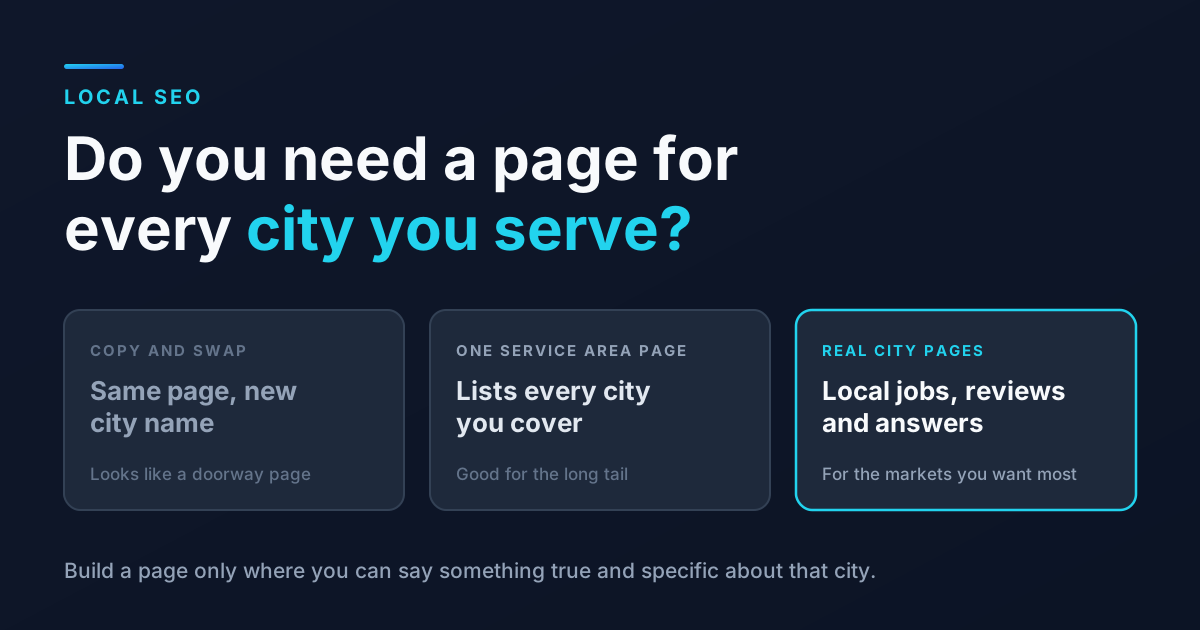
You do not need a page for every city you serve. You need a strong page for each core service, one page that clearly lists your full service area, and a dedicated city page only for the two or three markets you most want to win and can write something real about. Add more as the local work builds up.
A small number of genuinely local pages will almost always beat a large number of copies.
Why City Pages Can Help
Google's map results lean heavily on how close a business is to the person searching. If you are based in Chandler, you will have a harder time showing up in the Mesa map pack no matter what you do on your Google Business Profile. Adding Mesa to your service area tells customers you go there, but it does not make you rank there on its own.
The regular search results below the map are different. There, a page that clearly answers "AC repair in Mesa" with proof that you actually work in Mesa has a real shot. A good city page gives Google, and the person searching, a specific reason to pick you for that place.
We see this on our own site. Our city pages for places like Mesa and Scottsdale have been among the pages showing up most often in Google's AI answers. AI tools look for direct, specific answers to local questions, which is exactly what a well built city page provides. Our guide to showing up in AI Overviews explains why.
Why Copy and Paste City Pages Backfire
Google has a name for the swap the city name approach: doorway abuse. Its spam policies describe doorways as pages "created to rank for specific, similar search queries," and list "having multiple domain names or pages targeted at specific regions or cities that funnel users to one page" as an example.
That does not mean every city page is a problem. It means pages that exist only to catch a search, and give the visitor nothing they could not get from any other page on your site, are the kind Google does not want to reward. At best they get ignored. At worst they drag down how Google sees the rest of your site.
Which Cities Deserve Their Own Page
Start with where you already have something to say, not with a list of every town on the map.
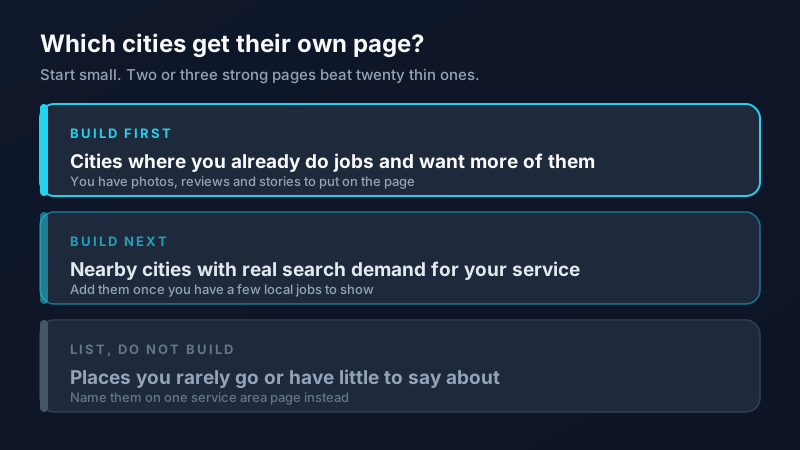
1. Cities where you already work and want more
Pull your last year of invoices and count jobs by city. The places with the most work, outside your home base, are your first candidates. You already have the raw material: project photos, customer reviews, and stories about the kinds of jobs you do there.
2. Nearby cities with real search demand
Check whether people actually search for your service plus that city. Google Search Console will show you which city searches already bring up your site, even when you are not ranking well yet. Our guides to using Search Console and doing keyword research without expensive tools walk through both.
3. Everywhere else
For towns you cover but rarely visit, a single service area page is enough. List the cities, show a simple map or description of your coverage, and link to the city pages you do have. That page helps people confirm you go to their area without you pretending to have deep roots there.
What to Put on a City Page
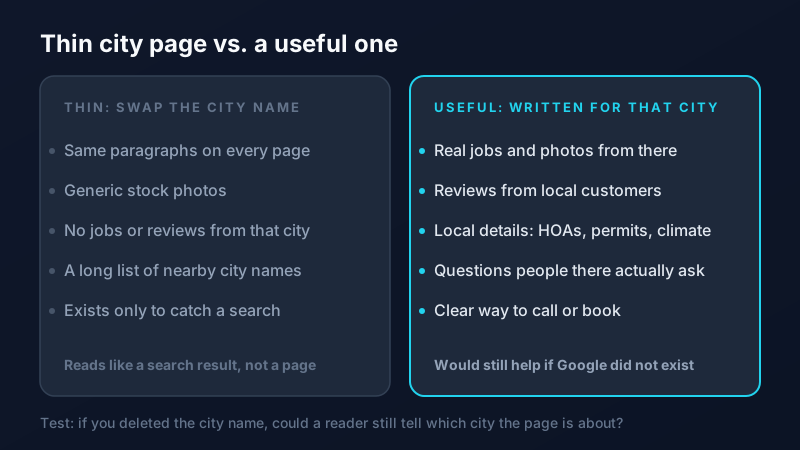
A good city page answers one question: why should someone in this city hire you? Here is what tends to make the difference.
- Real work from that city. Two or three short project write-ups with photos: what the problem was, what you did, and the neighborhood or part of town. Leave out anything that would identify a customer without their permission.
- Reviews from customers there. Pull in Google reviews that mention the city or a local neighborhood. If you do not have many yet, our guide to getting more Google reviews can help.
- Local details only a local business would know. HOA rules about exterior work, city permit requirements, older homes in a particular area, hard water, monsoon damage, how fast you can usually get there. These are the details a copy and paste page can never fake.
- A short local FAQ. Answer the questions people in that city actually ask you on the phone. Direct answers also give Google and AI tools something clear to quote.
- Your services, linked. Briefly mention what you offer there and link to your full service pages, so the city page does not try to repeat everything.
- An easy way to reach you. Phone number, a short form, and your hours, right on the page.
Keep the city in the page title, the main heading, and the URL (for example, /ac-repair-mesa-az), and make sure your business name, phone number, and address details match your Google Business Profile.
How to Link City Pages Into Your Site
A city page that nothing links to is hard for Google to find and easy for it to ignore. Link to each city page from your service area page, from relevant service pages ("We also serve Mesa"), and from blog posts that mention local work. Link the city pages to nearby city pages too, the way a real directory would. Our guide to internal linking for SEO covers a simple way to check that no page is left out.
How to Tell If Your City Pages Are Working
Give each page two to three months, then check three things:
- Search impressions and clicks for that page in Google Search Console, especially for searches that include the city name.
- Calls and form fills that come from that page. Set up call tracking so you can see which page made the phone ring.
- Jobs booked in that city. The page is only doing its job if the work shows up.
If a page gets impressions but no clicks, improve the title and description. If it gets no impressions at all, it probably needs more local substance, more internal links, or both. Update pages a few times a year with new projects and reviews so they stay current.
Start With One Page
Pick the city outside your home base where you most want more work. Gather three project photos, a few reviews, and the five questions customers there ask most. Write one page you would be proud to send a new customer. Then do the next one.
If you want help choosing your target cities or building pages that hold up, our SEO team builds city pages for local businesses across the Valley, from Chandler to Gilbert. Get in touch and we will look at where your next page should be.
Frequently Asked Questions
Do I need a separate page for every city I serve?
No. Most local businesses do best with a strong page for each core service, one service area page that lists every city you cover, and dedicated city pages only for the few markets you most want to win. Add more city pages as you build up local work and reviews in those places.
Are city pages considered doorway pages?
They can be. Google's spam policies list pages targeted at specific cities that funnel visitors to one page as an example of doorway abuse. Pages that are nearly identical with only the city name swapped are the main risk. City pages with real local projects, reviews, and answers are a different thing and can be genuinely helpful.
How many city pages should a small business have?
Start with two or three, for the cities outside your home base where you already do work and want more. It is better to have a few strong pages than dozens of thin ones. Add more once those are performing and you have real local content to share.
Will a city page help me show up in the Google Maps results for that city?
Not directly. Map results depend heavily on how close your business is to the searcher, along with your Google Business Profile and reviews. A good city page mostly helps you show up in the regular search results and AI answers for that city, which is often where businesses outside the area can compete.