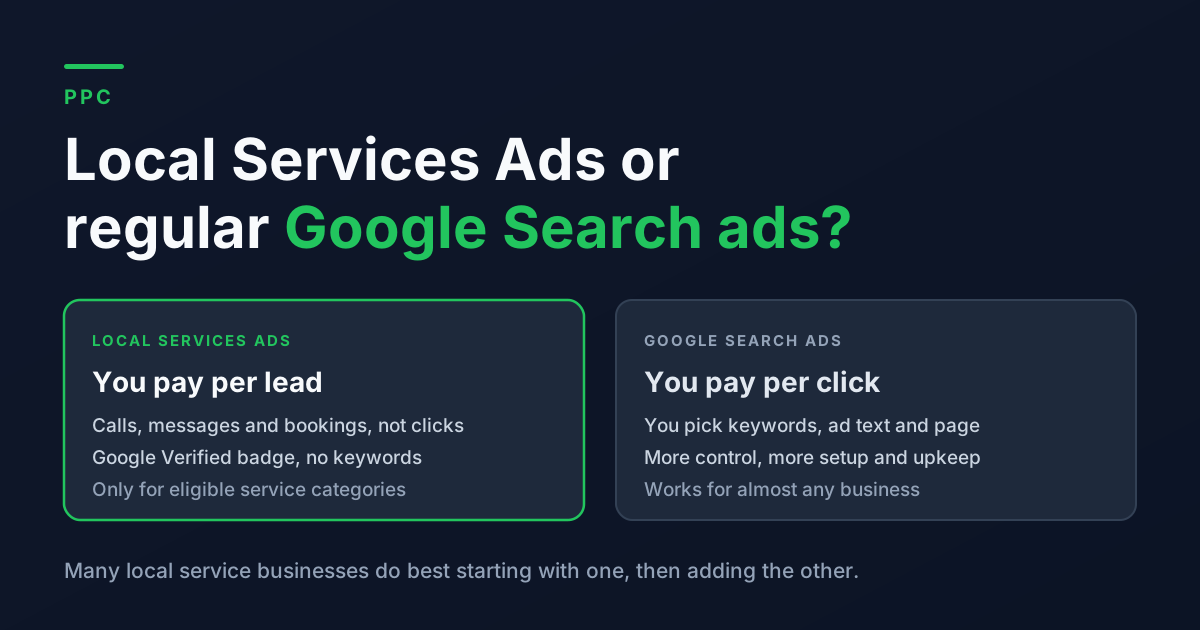
Picture a plumber in Mesa who decides it is time to run Google ads. A quick search turns up two very different options. One is the regular Google Ads most people know, where you bid on keywords and pay every time someone clicks. The other is Local Services Ads, the listings at the very top of the page with a "Google Verified" badge, where you only pay when someone actually calls, messages, or books.
Paying only for leads sounds like an easy choice. Sometimes it is. But Local Services Ads are not open to every business, they give you much less control, and Google changed how they work in a few important ways this year. Here is how the two compare and how to decide where your first ad dollars should go.
The Short Answer
If your business is in a category Local Services Ads support (plumbing, HVAC, electrical, cleaning, legal, and many other local services) and you can reliably answer the phone during business hours, Local Services Ads are usually the easier place to start. You pay per lead, setup is simpler, and your ad shows above everything else.
If your business is not eligible, if you want to promote specific high value jobs, or if you want more leads than Local Services Ads alone will send, regular Google Search ads are the tool. Many busy local service businesses end up running both.
What Each One Actually Is
Local Services Ads
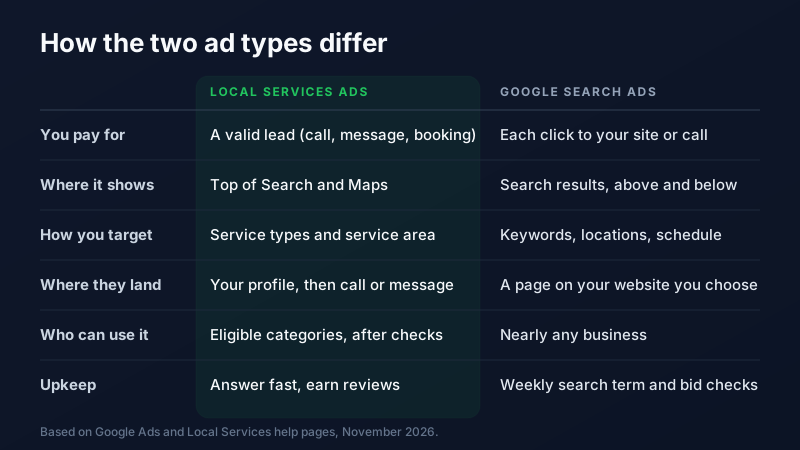
Local Services Ads (often shortened to LSA) show your business name, rating, review count, and a badge in a box at the top of Google Search and Maps for searches like "water heater repair near me." There are no keywords to choose. You tell Google which services you offer and which areas you cover, and it matches you to searches. When someone taps your listing, they land on a simple profile and can call, message, or book.
You pay per lead, not per click. According to Google's help page on how leads work, valid leads include answered calls, messages, voicemails, and booking requests. Before your ads run, your business goes through Google's screening and verification process. Since late 2025, verified businesses earn a single Google Verified badge, which replaced the older Google Guaranteed and Google Screened badges. Google also ended the money back guarantee that used to come with the Guaranteed badge.
Google Search ads
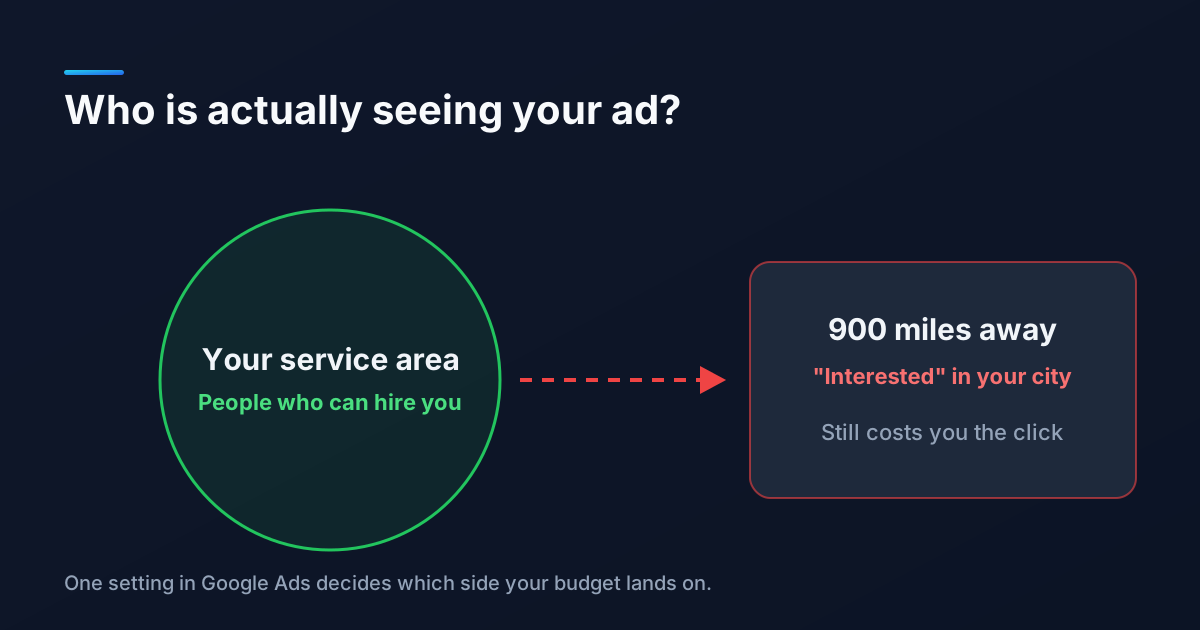
Regular Search ads are the text ads that appear above and below the normal results. You choose the keywords, write the ad, pick the page on your website people land on, set your budget, and decide where and when the ads run. You pay each time someone clicks, whether or not they ever call you.
That means more control and more responsibility. A well run Search campaign can target exactly the jobs you want most. A poorly run one can spend a lot on clicks from the wrong people. Our guides to negative keywords and location targeting settings cover the two most common leaks.
What Changed in 2026
If you looked at Local Services Ads a year or two ago, a few things are different now.
- They are moving into Google Ads. Google is moving Local Services Ads into Google Ads as Performance Max campaigns with pay per lead goals. The first group of U.S. home and storefront service businesses moved starting in August 2026, service area businesses without a storefront follow in late 2026, and remaining categories in 2027. You still pay per lead, the ads still show in the same places, and there are still no keywords. What changes is where you manage them: the old LSA dashboard goes away, weekly budgets become daily averages, and manual cost per lead bidding is retired. Google emails account admins 14 days before their account moves.
- Some missed calls now count as leads. Google's lead rules now say an unanswered call during your business hours can be charged if the caller stays on the line for more than 20 seconds. If the call goes through a phone menu, the clock starts after the caller presses a key. In plain terms: a phone nobody answers can now cost you money, not just jobs.
- Reviews come from your Business Profile. The rating and review count on your ad come from your Google Business Profile, and your business name, address, and hours now sync from it too. Keep that profile accurate.
How Ranking Works on Each
On Search ads, your position depends on your bid and how relevant and useful Google thinks your ad and landing page are, which is the idea behind Quality Score.
Local Services Ads work differently. Google's page on how ads are ranked lists your bid, how likely your ad is to turn into a lead (including how responsive you are, since missed calls can hurt), how relevant you are to the search, and the quality of your profile: your rating, number of reviews, response time, photos, and verification. In other words, the businesses that answer fast and have strong reviews tend to win. Our guides on responding to new leads quickly and getting more Google reviews help with both, and both help your organic map rankings too.
How to Compare the Cost
Comparing a cost per lead to a cost per click is not apples to apples. The fair comparison is what you pay for each real conversation with a potential customer.
Here is an example with made up round numbers, not a benchmark. Say your Search ads cost $12 per click and one in eight clicks turns into a call or form. Each lead costs you about $96. If Local Services Ads charge you $55 per lead in your area, they are the better deal for those jobs. If they charge $110, Search ads might be cheaper, as long as your campaign is set up well. The only way to know your real numbers is to track them. Set up conversion tracking in Google Ads and call tracking on your website so every lead has a source.
Then go one step further and compare booked jobs, not just leads. A cheap lead that never books is not cheap.
Which One Should You Start With?
Start with Local Services Ads if
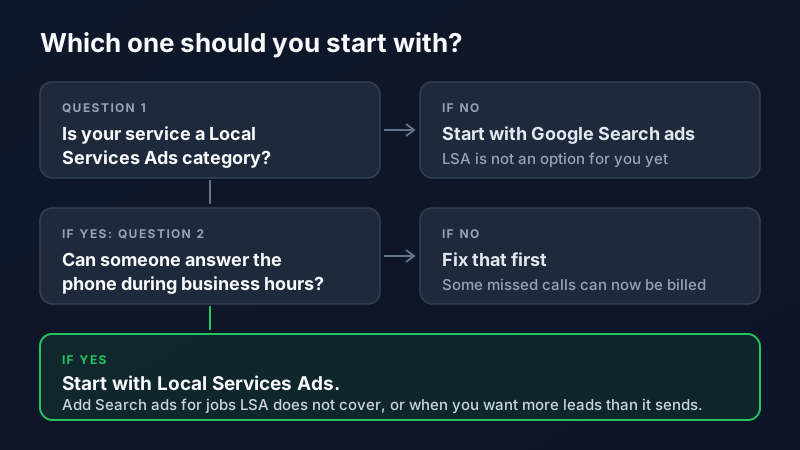
- Your service is an eligible category in your area (check by starting a sign up at Google's Local Services page).
- You can answer calls and messages quickly during the hours you list.
- You already have, or are actively building, solid Google reviews.
- You want a simpler setup and do not have time to manage keywords every week.
Start with Google Search ads if
- Your business is not eligible for Local Services Ads.
- You want to push specific jobs, like full system replacements instead of small repairs, and send people to a page built for that job.
- You want control over exactly which searches you show up for, which cities, and which hours.
- You have someone, in house or an agency, who will check search terms and results every week.
Run both when
Local Services Ads are working but you want more leads than they send, or you offer services LSA does not cover. Showing up in both spots for the same search also takes more of the page away from competitors. Just track them separately so you know which one is actually paying for itself.
Before You Spend a Dollar
- Answer the phone. Set your business hours to times someone is truly available, and turn on message leads only if you will reply quickly.
- Clean up your Business Profile. Name, hours, service area, and photos should all be current, since your ads pull from it.
- Set a budget you can hold for 90 days. Either type needs a few months to settle. Our guide to setting a marketing budget can help you pick a number.
- Watch your leads every week. In Local Services Ads, rate each lead and flag ones that are spam or outside your service area. Google reassesses charged leads for up to 30 days and may credit poor quality ones.
Not Sure Which Fits?
The right answer depends on your trade, your area, and how your phones are staffed. If you want a second opinion, our PPC team sets up and manages both Local Services Ads and Google Search campaigns for local businesses across the Valley, from Phoenix to Mesa. Get in touch and we will tell you honestly where we would start.
Frequently Asked Questions
What is the difference between Local Services Ads and Google Ads?
Local Services Ads charge you per lead, such as a call, message, or booking, and show at the very top of Google with a Google Verified badge. Regular Google Search ads charge you per click, and you choose the keywords, ad text, and landing page yourself. Local Services Ads are simpler but only available to eligible service categories, while Search ads work for almost any business and give you more control.
Are Local Services Ads still separate from Google Ads?
Not for long. Google is moving Local Services Ads into Google Ads as Performance Max campaigns with pay per lead goals. The first U.S. accounts moved starting in August 2026, with service area businesses without a storefront following in late 2026 and the rest in 2027. You still pay per lead and still show in the same places, but you manage everything inside Google Ads.
Do you pay for missed calls with Local Services Ads?
Sometimes. Under Google's current rules, an unanswered call during your business hours can be charged as a lead if the caller stays on the line for more than 20 seconds. If your phone system uses a menu, the timer starts after the caller presses a key. Setting accurate business hours and answering quickly is the best protection.
Can I run Local Services Ads and Google Search ads at the same time?
Yes, and many local service businesses do. Local Services Ads often bring in the most affordable leads, and Search ads fill the gaps for services LSA does not cover or when you want more volume. Track each one separately so you can compare the cost per booked job, not just the cost per lead.