Here is a question most small business owners cannot answer: how many leads did your Google Ads generate last month, and which keywords delivered them? If the answer is anything other than a specific number tied to specific search terms, your conversion tracking is broken. And if it is broken, every optimization decision you (or your agency) makes is guesswork.
The good news: setting up clean conversion tracking in Google Ads is a one-afternoon project, not a six-week consultant engagement. This guide walks through the exact setup we run for every new PPC client, what to track, what to skip, and the common mistakes that quietly contaminate the data.
What Conversion Tracking Actually Does
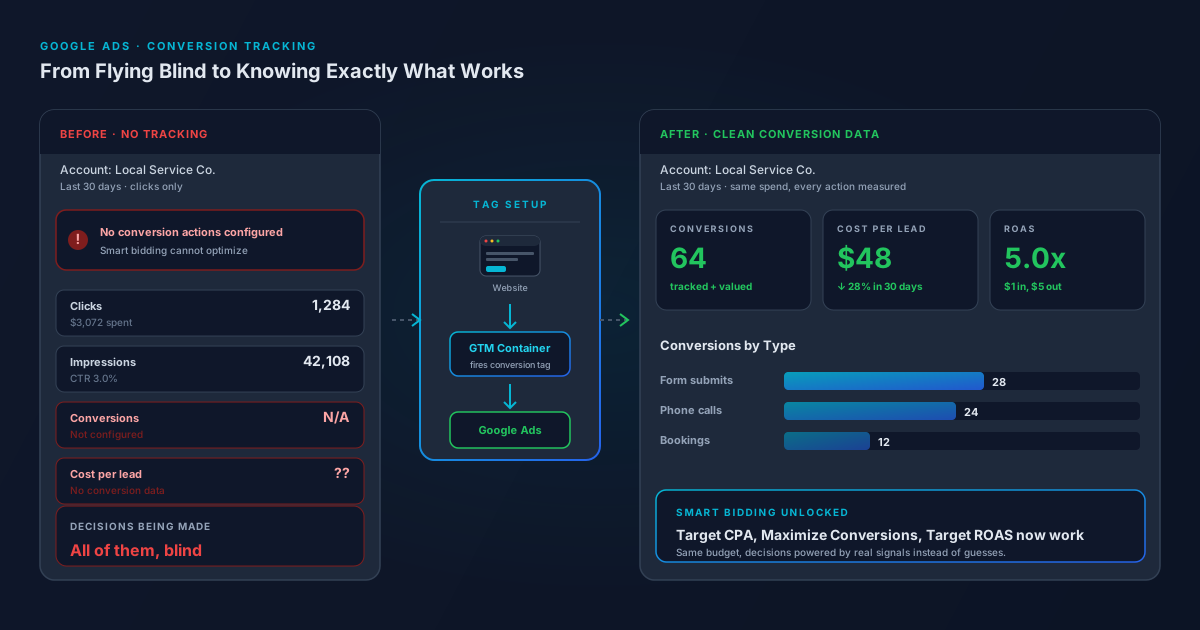
Every click on a Google Ad sends a visitor to your website. Conversion tracking is the small piece of code that watches what those visitors do next, and reports the meaningful actions (a form submission, a phone call, a purchase) back to Google Ads. Without it, Google sees clicks and not much else, and so do you.
The downstream impact is bigger than it sounds. Google's smart bidding strategies (Maximize Conversions, Target CPA, Target ROAS) literally cannot run without conversion data. The algorithm uses your conversion signals to decide which auctions to bid into and how aggressively. Feed it bad or missing data and it bids blindly. Feed it clean data and it routinely cuts cost per lead by 20 to 30 percent within 30 days.
The Four Conversions Every Small Business Should Track
Resist the urge to track every click and scroll. Smart bidding works best when it has a small set of high-quality signals, not a giant pile of low-value ones.
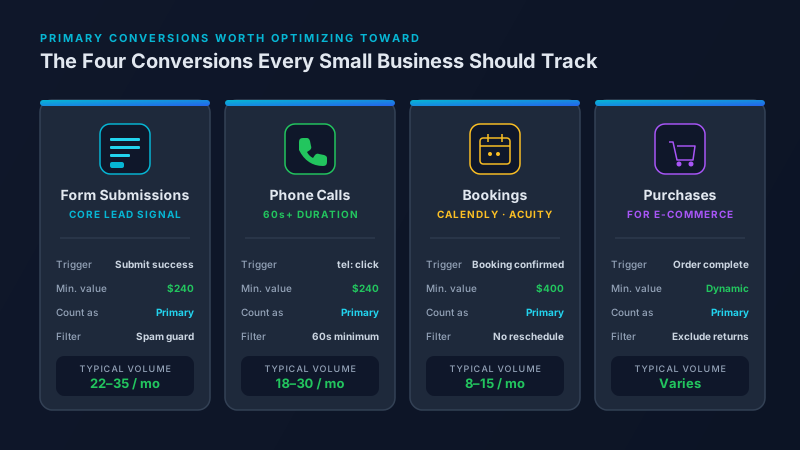
- Form submissions. The contact form, quote request, and any lead capture form on your site. This is usually the most important conversion for service businesses.
- Phone calls. Track calls from the call extension in your ads (built-in) and calls from your website (requires the website call tracking tag). Set a minimum duration (60 seconds is the standard) so 5-second wrong numbers do not count.
- Booked appointments. If you use a calendar tool like Calendly, Acuity, or HoneyBook, fire a conversion when a booking is confirmed.
- Purchases or checkout completions. For e-commerce, the order confirmation page is the only conversion that matters at the top of the hierarchy.
The Five-Step Setup (Plan for One Afternoon)
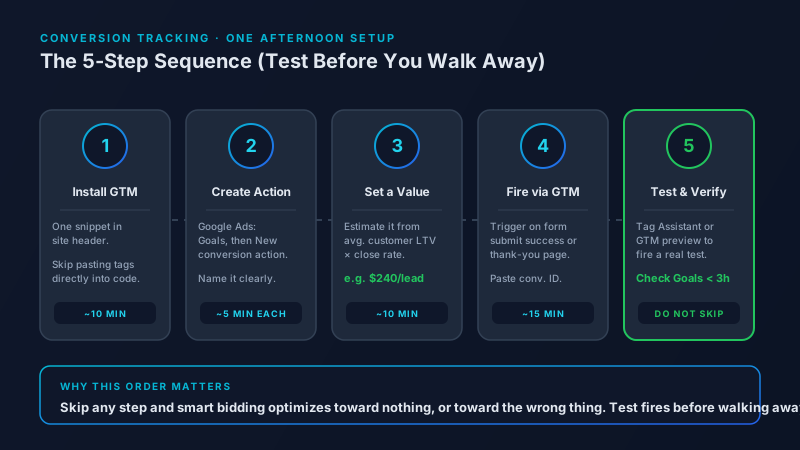
1. Install Google Tag Manager. Skip the temptation to paste the conversion tag directly into your site code. Use Google Tag Manager (GTM) as the container. It is free, takes 10 minutes to install (one snippet in your site header), and lets you add or change tracking later without touching the codebase. If you are on Shopify, Squarespace, or WordPress, every platform has a native GTM integration.
2. Create a Google Ads conversion action. In Google Ads, go to Goals, then Summary, then New conversion action. Pick "Website" for form submissions and online actions, "Phone calls" for call tracking, or "Import" if you want to import conversions from a CRM like HubSpot or Salesforce. Give each conversion action a clear name (Lead Form Submission, Phone Call 60s+) so the data is readable later.
3. Set a conversion value. Even if you do not have a per-lead value yet, assign an estimated one. If your average customer is worth $1,200 and your form-to-customer rate is 20 percent, every lead is worth roughly $240. Smart bidding uses this number to optimize. Skip it and you are flying half-blind.
4. Fire the tag through GTM. In Google Tag Manager, create a new tag, pick "Google Ads Conversion Tracking," paste your conversion ID and label from step 2, and set the trigger. For most form submissions, the trigger is "form submit success" or a page view of the thank-you page. For phone calls from the website, fire on click of the tel: link.
5. Test before you walk away. Use the Tag Assistant Chrome extension or GTM preview mode to fire a real conversion. Then check Google Ads under Goals to see if the test conversion appears within a few hours. If it does not, fix it now, not in three months when you realize the data has been zero the whole time.
Primary vs Secondary Conversions (The Setting That Trips Everyone Up)
Google Ads splits conversion actions into two buckets. Primary conversions drive bidding decisions. Secondary conversions are recorded for reporting only. Most accounts have this wrong.
The rule: mark only your highest-quality conversion actions as Primary. For a service business that means form submissions and qualified phone calls, not every newsletter signup or PDF download. If you mark a low-quality conversion as Primary, smart bidding will optimize toward whatever cheap action it can find, and your real cost per qualified lead goes up. Use Secondary for soft signals you want to watch but not bid against.
Three Common Mistakes
Tracking the same conversion twice. A common pattern: the form fires a conversion on submit, and the thank-you page also fires a page-view conversion. Now every real lead counts as 2. Pick one trigger per action and stick with it.
Counting every form, including spam. If your contact form gets 80 spam submissions a month, those are all firing as conversions and skewing your bid optimization. Add a honeypot field or a reCAPTCHA, and only fire the conversion after the spam filter has cleared the submission.
Forgetting to update when the site changes. A site redesign breaks tracking more often than anything else. Keep a one-page list of every conversion tag, where it lives, and what triggers it. Re-test every tag after any major site change or platform migration.
The Bottom Line
Conversion tracking is the foundation that every other Google Ads optimization sits on. Without it, your negative keyword reviews, your Quality Score work, and your landing page tests are all educated guessing. Spend one afternoon getting it right and the next six months of optimization actually compound. Most small business accounts we audit have at least one broken or duplicate conversion action, and fixing it alone is usually worth a 15 to 25 percent improvement in cost per lead.
Frequently Asked Questions
Why does conversion tracking matter for Google Ads?
Without conversion tracking, Google Ads only sees clicks. You cannot tell which keywords, ads, or audiences drive real leads or revenue, and smart bidding strategies like Target CPA and Maximize Conversions cannot function. Properly tracked accounts typically see cost per lead drop by 20 to 30 percent within the first 30 days once smart bidding has clean data to work with.
Do I need Google Tag Manager to track Google Ads conversions?
You do not technically need it, but you should use it. Pasting conversion tags directly into your site code creates a maintenance headache and forces a developer to touch the codebase every time you want to add or change a tag. Google Tag Manager is free, takes 10 minutes to install, and lets a marketer manage every tracking tag from a single dashboard for the life of the site.
How do I track phone calls as Google Ads conversions?
There are two call conversion paths. Calls placed directly from a call extension in your ad are tracked automatically once you enable call reporting in Google Ads. Calls placed from your website (someone clicks a tel: link or dials the number after landing) require the Google Ads website call tracking tag, which dynamically swaps your phone number with a forwarding number to attribute the call. Set a minimum call duration of 60 seconds so short or accidental calls do not register as conversions.
What is the difference between primary and secondary conversions in Google Ads?
Primary conversions feed Google's smart bidding algorithm and drive bidding decisions. Secondary conversions are recorded in your reports but do not influence bids. Mark only your highest-quality actions (qualified leads, sales) as Primary. Use Secondary for soft signals like newsletter signups, PDF downloads, or scroll depth that you want to monitor without skewing your bid strategy toward cheap, low-intent actions.
How long does it take to see conversion data after setup?
Test conversions fired through Tag Assistant or GTM preview mode typically show up in the Google Ads Goals dashboard within 3 hours. Real campaign conversion data appears as users complete actions, usually within a day of going live. Plan to verify the first 5 to 10 real conversions to confirm the values and attribution are correct before relying on the data for smart bidding decisions.