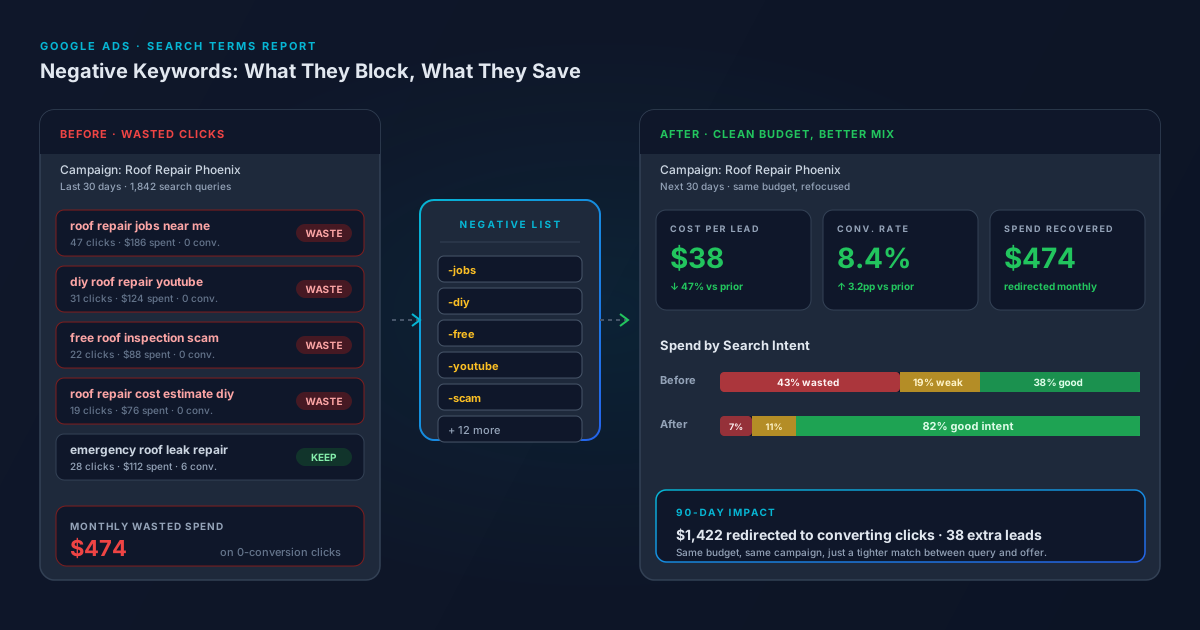
If you have ever scrolled through your Google Ads search terms report and wondered why you spent $186 on people searching for "roof repair jobs near me," you already understand the problem. Most small business Google Ads accounts are leaking 30 to 45 percent of their budget on searches that were never going to convert. The fix is not a smarter bidding strategy or a bigger budget. It is a tighter list of negative keywords, reviewed every week.
This guide walks through what negative keywords actually do, the three match types you can use, and the simple weekly workflow we run for every PPC client to keep budgets focused on the queries that pay.
What Negative Keywords Actually Do
A negative keyword tells Google: "If a person's search query includes this word or phrase, do not show my ad." That is it. They do not change your bids, they do not lower your Quality Score, and they do not get added to your keyword list. They sit quietly in the background, blocking your ad from showing on irrelevant queries.
The reason this matters: Google's match types (especially broad match and the increasingly loose phrase match) will happily show your ad on searches you would never have chosen yourself. A florist bidding on "wedding flowers" can end up paying for clicks on "wedding flowers wholesale," "wedding flowers diy tutorial," and "wedding flowers job vacancies" if nothing is stopping them. Negative keywords are what stops them.
Why This Is the Highest-Leverage PPC Task You Can Do
Three things happen when your negative keyword list is healthy:
- Cost per lead drops. You are no longer paying for clicks that never had a chance to convert. Even a modest list of 15 to 25 negatives typically cuts cost per lead by 20 to 40 percent in the first 60 days.
- Quality Score improves. Google measures the click-through rate of your ads against people who are actually looking for what you sell. When you stop showing up for "diy" and "free" and "jobs," your CTR climbs and your Quality Score climbs with it, which means lower cost per click on the good searches.
- Your data gets cleaner. When the search terms report is full of garbage queries, every optimization decision you try to make is contaminated. Clean it up and you can finally see what is actually working.
The Three Match Types (And When to Use Each)
This is where most account managers get sloppy and where most of the easy wins are hiding. Negative keywords have their own match types, separate from your regular keyword match types, and the rules are slightly different.
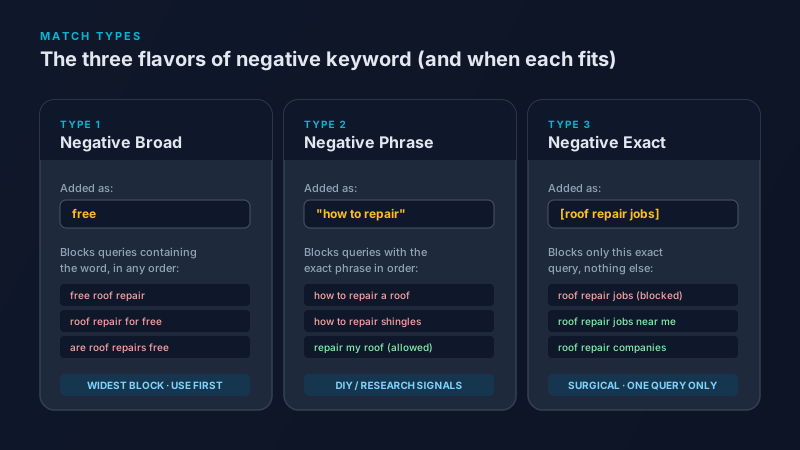
Negative broad match blocks any search query that contains the word, in any order. Adding "free" as a negative broad keyword blocks "free roof repair," "roof repair for free," and "are roof repairs ever free." This is the workhorse. Use it for any word that signals the wrong intent, regardless of where it appears in the query.
Negative phrase match (added in quotes, like "how to repair") blocks queries that contain the exact phrase in order. It blocks "how to repair a roof" and "how to repair shingles" but allows "repair my roof" through. Use phrase match when you want to catch a specific pattern, like the classic DIY signal phrases "how to," "do it yourself," "step by step," and "tutorial."
Negative exact match (added in brackets, like [roof repair jobs]) blocks only that single exact query and nothing else. It is the most precise tool and the easiest one to misuse. Save it for high-volume queries you want to block while keeping nearby variations live.
The Starter List Every Local Service Business Should Have on Day One
If you have never built a negative keyword list, start with this set. It will plug 60 to 70 percent of the obvious leaks before you have even looked at your search terms report.
- Job seekers: -jobs, -hiring, -career, -salary, -employment, -resume
- DIY and research intent: -diy, -tutorial, -youtube, -reddit, -how to, -guide, -training, -course
- Free seekers: -free, -cheap, -coupon, -discount, -groupon
- Wholesale or B2B (if you are B2C): -wholesale, -bulk, -supplier, -manufacturer
- Wrong service category: add any service you do not offer (a plumber should negative -hvac, -electrician, -appliance repair, etc.)
- Off-topic but expensive: -movie, -song, -lyrics, -definition, -meaning, -wiki, -wikipedia
Add these as negative broad keywords at the account level using a shared negative keyword list, so every campaign inherits them automatically.
The Weekly Workflow That Keeps the Account Clean
The starter list is the easy part. The real work is the weekly review, because your search terms report is constantly producing new variations that the starter list will not catch. Block 15 minutes on your calendar every Friday and follow this:
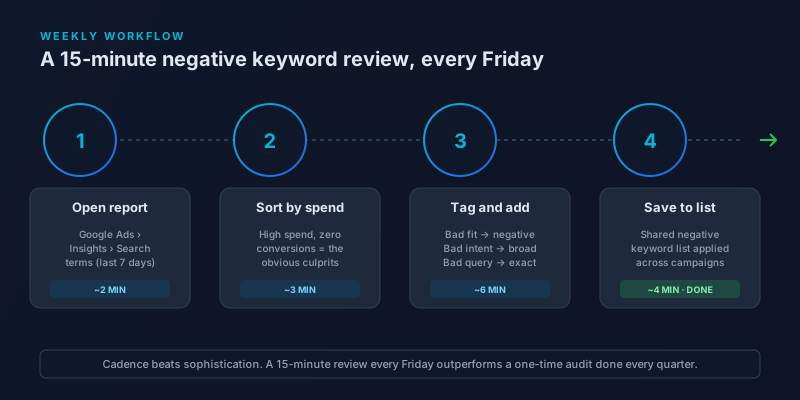
- Open the search terms report for the last 7 days. (Google Ads, left nav, Insights and reports, then Search terms.)
- Sort by cost, descending. The queries that are burning the most money with zero or weak conversions are at the top. Those are your priorities.
- Tag each bad query. Wrong service or wrong intent? Add a single bad word as a negative broad. A consistent phrase pattern across many bad queries? Add a negative phrase. One specific high-volume bad query with good neighbors nearby? Add it as a negative exact.
- Save everything to a shared negative keyword list. Apply the list to every search campaign. This is how the work compounds: a negative you add this Friday protects your budget across every campaign, forever.
Three Mistakes That Make Negative Keywords Worse, Not Better
Over-blocking. Adding "repair" as a negative broad to a roof repair campaign because one bad query had it sounds reasonable for about five seconds. It also blocks every legitimate search you actually want. Always think about what else the word might appear in before you add it as broad.
Confusing match types. A negative phrase keyword written without quotes is treated as broad, which is much wider. A negative exact written without brackets does the same thing. If you are pasting from a spreadsheet, double-check the formatting. We have seen accounts drop to half the impressions overnight because someone meant to exclude one phrase and accidentally excluded a whole word.
Adding negatives that conflict with your keywords. If you bid on "emergency roof repair" as a keyword but also have "emergency" on your negative list, your own keyword is dead. Google warns you about most of these in the interface, but spreadsheet imports skip the warning. Spot-check the list against your keyword list once a month.
The Bottom Line
Negative keywords are the closest thing to free money in Google Ads. They do not require a bigger budget, a smarter bidding strategy, or a redesigned landing page. They just require 15 minutes a week and the discipline to actually do it. Most accounts we audit have not had a negative keyword review in six months or longer. The ones that do, run circles around the competition on the same spend. Build the starter list today, put the Friday review on your calendar, and let the savings compound.
Frequently Asked Questions
What are negative keywords in Google Ads?
Negative keywords are words or phrases you add to your campaign to prevent your ad from showing on searches that contain them. They are the inverse of regular keywords: instead of telling Google when to show your ad, they tell Google when not to. They do not affect your Quality Score directly and they do not cost anything to add, but a healthy negative list is one of the single largest levers for lowering cost per lead.
How many negative keywords should I have in my Google Ads account?
There is no fixed number. Most healthy small business accounts run between 50 and 300 negative keywords across all campaigns, with the list growing over time as the search terms report surfaces new bad queries. Quality matters more than quantity: 80 well-chosen negatives outperform 800 random ones, especially if some of the 800 are accidentally blocking valid traffic.
What is the difference between negative broad, phrase, and exact match?
Negative broad blocks any query containing the word in any order, which makes it the widest filter. Negative phrase (in quotes) blocks queries that contain the exact phrase in order, allowing close variations through. Negative exact (in brackets) blocks only that one specific query and nothing else. Most negatives should be added as broad. Reach for phrase or exact only when you need to protect nearby valid queries from being blocked.
How often should I review my Google Ads search terms report?
Once a week is the right cadence for most small business accounts. Daily is overkill and quickly becomes a chore you skip. Monthly leaves enough time for a new bad query to drain hundreds of dollars before you catch it. A 15-minute Friday review, sorted by cost descending, is the sweet spot between thoroughness and sustainability.
Do negative keywords improve my Quality Score?
Indirectly, yes. Negative keywords do not have a Quality Score of their own, but by preventing your ad from showing on low-intent queries, they raise the average click-through rate of the searches you do show on. Click-through rate is one of the three components of Quality Score, so a cleaner search terms report typically pulls Quality Score up over 30 to 60 days. The cost-per-click savings from a higher Quality Score often outweigh the direct savings from blocked clicks.