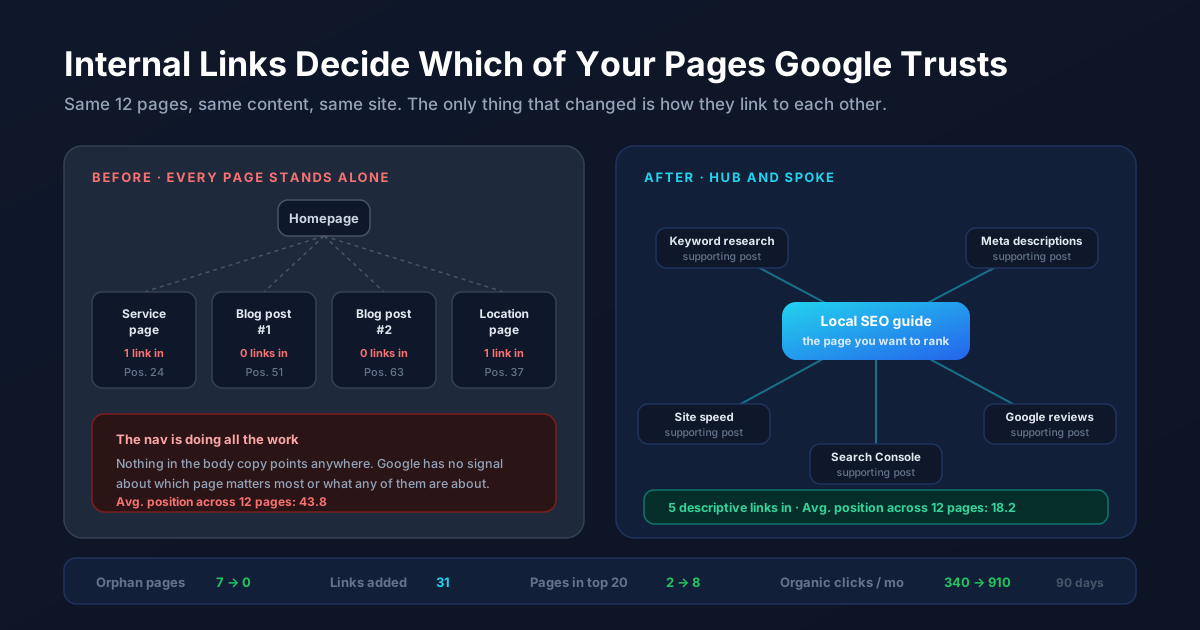
Most small business websites have more SEO value sitting inside them than the owner realizes. The problem is rarely a shortage of pages. It is that the pages have no relationship to each other, so every one of them has to fight for rankings alone.
Internal linking is the fix, and it is the cheapest SEO work available to you. No new content, no outreach, no budget. Just deciding which of your existing pages should point at which others, and saying something useful in the link text.
What an Internal Link Actually Tells Google
An internal link does two jobs at once. The first is discovery. Google follows links to find pages, and a page that nothing links to gets crawled rarely and treated as an afterthought. The second job is the interesting one. Every link is a small vote that says this page matters, and the words inside the link tell Google what the page is about.
That second part explains why a perfectly good service page can sit stranded on page four. Google can see the page. It simply has no evidence that the page is important, or what topic it deserves to rank for, because nothing on your own site ever points at it and describes it.
Start by Finding Your Orphan Pages
Before you add a single link, find out what is starving. Pull your list of URLs from your sitemap or from the Pages report in Google Search Console, then count how many internal links point at each one. Free crawlers handle up to about 500 URLs, which covers nearly every small business site with room to spare.
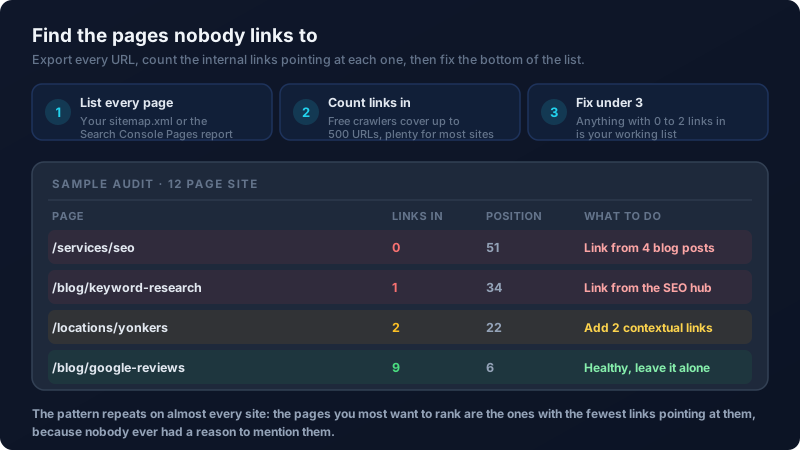
That pattern repeats on almost every site. Service pages and location pages come up naturally in your writing far less often than blog topics do, so the pages that make you money end up with the fewest votes. Nobody planned it that way. It just happens when links are left to chance.
Write Anchor Text That Says Something
The words you choose to link are the entire message. Phrases like "click here" and "learn more" still pass authority, but they describe nothing, so Google learns nothing about the destination and neither does the reader deciding whether the click is worth it.
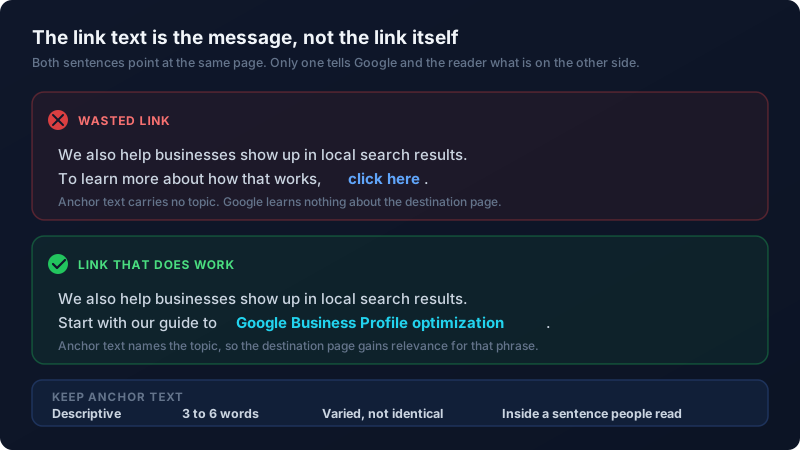
Keep anchor text to roughly three to six words that name the topic of the destination page. Vary the phrasing instead of repeating one identical string in twenty places, and keep it inside a sentence a person would actually read. The instinct is the same one behind writing meta descriptions that earn clicks: describe the value waiting on the other side, do not just label the mechanism.
Build Hubs, Not Random Links
Scattering links at random gets you very little. What works is choosing one page you genuinely want to rank, treating it as a hub, and pointing every related post at it with descriptive anchor text. The hub then links back out to each supporting post, which gives Google a cluster it can read as a body of expertise on one subject rather than a pile of unrelated articles.
Choose that hub by money, not by traffic. It should be the page that turns a reader into a customer, usually a service page or a substantial guide. Posts on keyword research, site speed, and Google Business Profile optimization all naturally support an SEO services page, so each of them should say so somewhere in its body copy.
Make It a Habit, Not a Project
Internal linking decays because people treat it as a one time cleanup. Two small rules keep it healthy with almost no effort. First, every time you publish something new, add at least two links out to older pages, then go back to one older post and link into the new one. Second, once a quarter, re-run the orphan audit and fix whatever slipped through.
Results are not instant, but they show up faster than almost any other SEO work, usually within a few weeks of Google recrawling the pages you changed. If you would rather have someone map the clusters and do the work for you, get in touch and we will start with an audit of what you already have.
Frequently Asked Questions
How many internal links should a page have?
There is no magic number, but a useful floor is three internal links pointing at any page you want to rank, and two to five links leading out of every article. What matters far more than the count is whether each link is genuinely relevant and sits inside a sentence that reads naturally. Ten forced links help less than three well placed ones.
Do internal links help SEO as much as backlinks?
They work differently. Backlinks from other websites build your site's overall authority, and internal links decide how that authority is distributed across your own pages. You control internal links completely and they cost nothing, which makes them the faster win. A site with strong backlinks but poor internal structure is very common, and it usually means one or two pages rank while everything else sits buried.
What is anchor text and why does it matter for internal links?
Anchor text is the visible, clickable wording of a link. It matters because search engines use it as a description of the page being linked to, which is one of the clearest relevance signals you can send about your own content. Descriptive anchor text like "Google Business Profile optimization" tells Google what the destination is about, while "click here" tells it nothing at all.
Should I use the same anchor text every time I link to a page?
No. Vary it while keeping the topic consistent, so one link might read "keyword research" and another "finding the phrases customers search". Identical anchor text repeated across dozens of links looks manipulative and reads badly to humans. Natural variation covers more related phrases and keeps the writing readable, which is the point.
How long does it take to see results from internal linking?
Usually two to six weeks, once Google recrawls the pages you changed. Pages that were previously orphaned tend to move the fastest because they were starting from almost no signal at all. Changes to pages that already rank well move more slowly and in smaller increments, which is normal and not a sign the work failed.