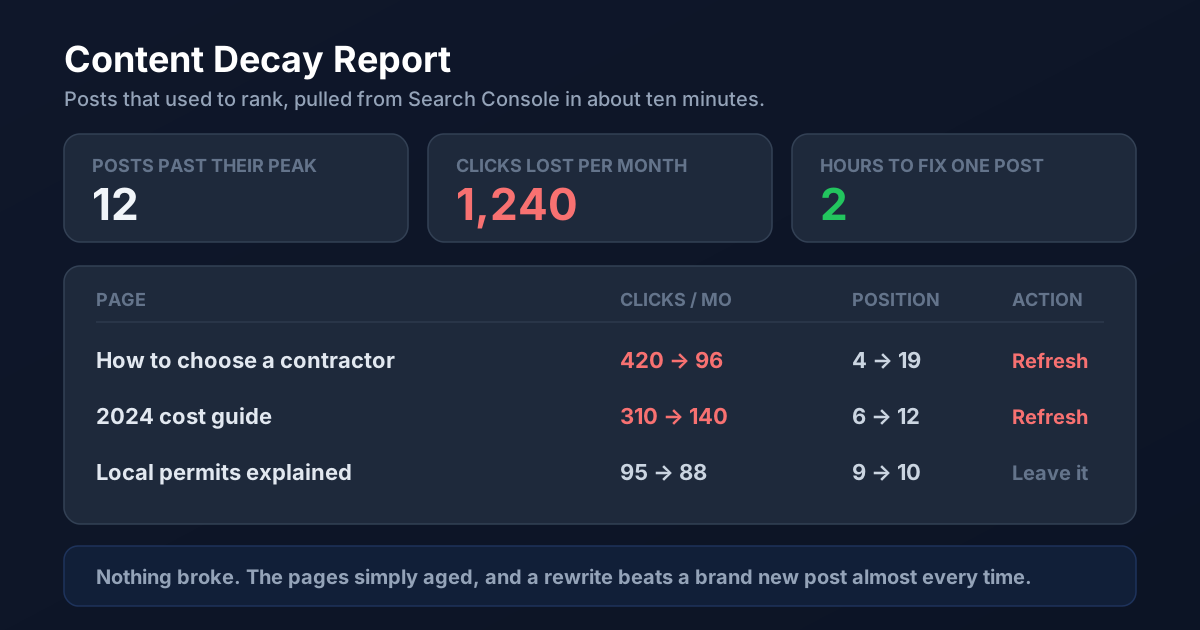
Most small business blogs are treated like a conveyor belt. Publish something new, watch it do modestly well, publish the next thing, never look back. Meanwhile the posts behind you are quietly losing the rankings they earned, and the single highest return hour in your marketing week is spent fixing one of them rather than writing a twenty eighth.
Decay Is the Default, Not a Punishment
A post usually climbs for two or three months, holds a peak for a while, then declines. That is not a penalty and it rarely means you did anything wrong. Competitors published newer pages, the facts in yours aged, and search results reshuffled around them.
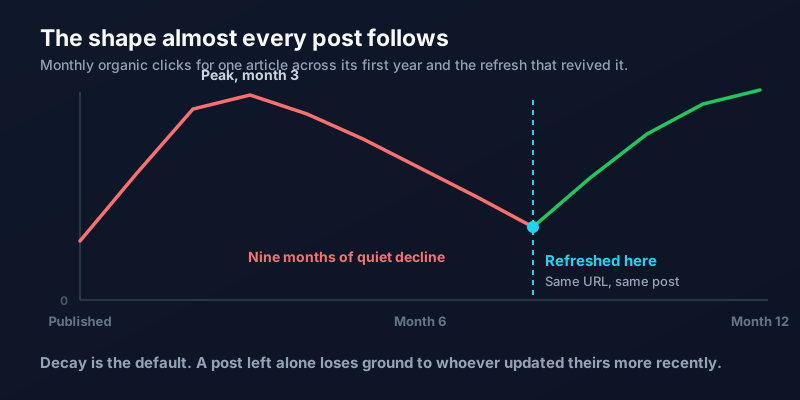
The important part is that the page has already done the hard work. It has history, it has links, and Google already understands what it is about. Reviving that is far cheaper than convincing search engines to trust something brand new.
Find the Pages Worth Saving
Open Google Search Console, go to Search Results, and compare the last three months against the same period a year earlier. Sort by the biggest drop in clicks. You are looking for pages that once performed and no longer do, and our walkthrough of Search Console covers the report in detail if it is unfamiliar.
Refresh a page when it lost real traffic, when it sits between positions 5 and 20 (close enough that improvement pays), or when it contains a year, a price, or a statistic that is now wrong. Leave it alone when traffic is flat but healthy, when the topic no longer matters to your business, or when the page never ranked at all. That last case is not decay. It is a page that needs a different keyword, which is a keyword research problem instead.
What to Actually Change
A refresh is not a light edit and it is not a rewrite from scratch. It is five specific passes.
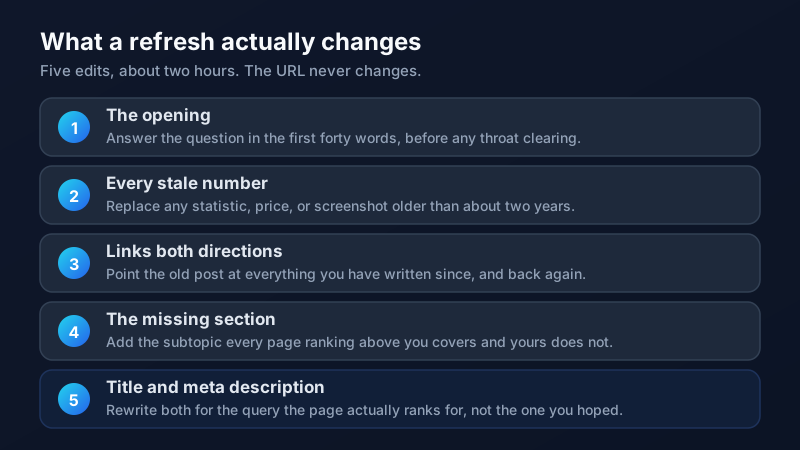
Step four is the one people skip and the one that moves rankings most. Search the query your page targets, read the three results above you, and write down every subtopic they cover that you do not. Add the ones that genuinely belong. You are not padding word count, you are closing gaps.
Step three compounds over time. An older post that links out to your newer work, and gets linked back from it, gets stronger in both directions, which is the whole argument for treating internal linking as a real task. And since you are rewriting the title anyway, apply what you know about meta descriptions that earn clicks.
The Rules That Keep a Refresh From Backfiring
Never change the URL. The existing address holds every link and every ounce of history the page has accumulated, and a new slug throws that away in exchange for nothing. Edit in place.
Update the visible date only if you genuinely reworked the content. Changing a date on an untouched page is a trick readers notice and search engines do not reward. And do not delete the old version to republish it as a new post, which is the most expensive version of this mistake.
Then wait. Give it four to six weeks before judging the result, and compare the same window against the period before you touched it.
Make It a Habit, Not a Project
The businesses that win here do not run an annual content audit. They refresh one post a month, forever. Twelve revived pages a year, each taking about two hours, will almost always beat twelve additional posts competing against everything already published on the internet.
Put it on the calendar next to whatever else you do monthly. If you would rather have someone pull the decay report and tell you which five pages to start with, get in touch and we will take a look at yours.
Frequently Asked Questions
How often should I update old blog posts?
Aim for one post a month rather than a large annual audit. Check Search Console quarterly for pages losing clicks, keep a short running list, and work through it steadily. Pages covering prices, tools, laws, or anything with a year in the title need attention more often, roughly every six to twelve months, because the information in them goes stale on a schedule.
Should I change the URL when I update a post?
No. The URL carries the page's entire history, including every link pointing at it and everything search engines have learned about it. Changing the slug discards that and forces you to start over, even with a redirect in place. Edit the existing page and leave the address exactly as it is, no matter how much the content changes.
Does updating the publish date help SEO?
Only when the update is real. If you substantially reworked the content, showing a current date is honest and helps readers judge relevance. Changing the date on a page you did not meaningfully edit does not improve rankings, and readers who recognize the same stale article with a fresh date trust you less. The content change is what matters, not the timestamp.
How long does it take to see results from a content refresh?
Usually four to six weeks, sometimes sooner for pages that were already close to the top. Google needs to recrawl the page and reassess it, and shifts in position take time to show up in traffic. Compare the six weeks after the refresh against the six weeks before, and resist the urge to judge it after a few days.
Is it better to refresh old posts or write new ones?
Refreshing usually wins, and it is not close for most small business blogs. An existing page already has history, links, and an established topic, so improving it competes against a much lower bar than launching something new. A reasonable split is one refresh for every two or three new posts, weighted further toward refreshing once you have twenty or more articles published.