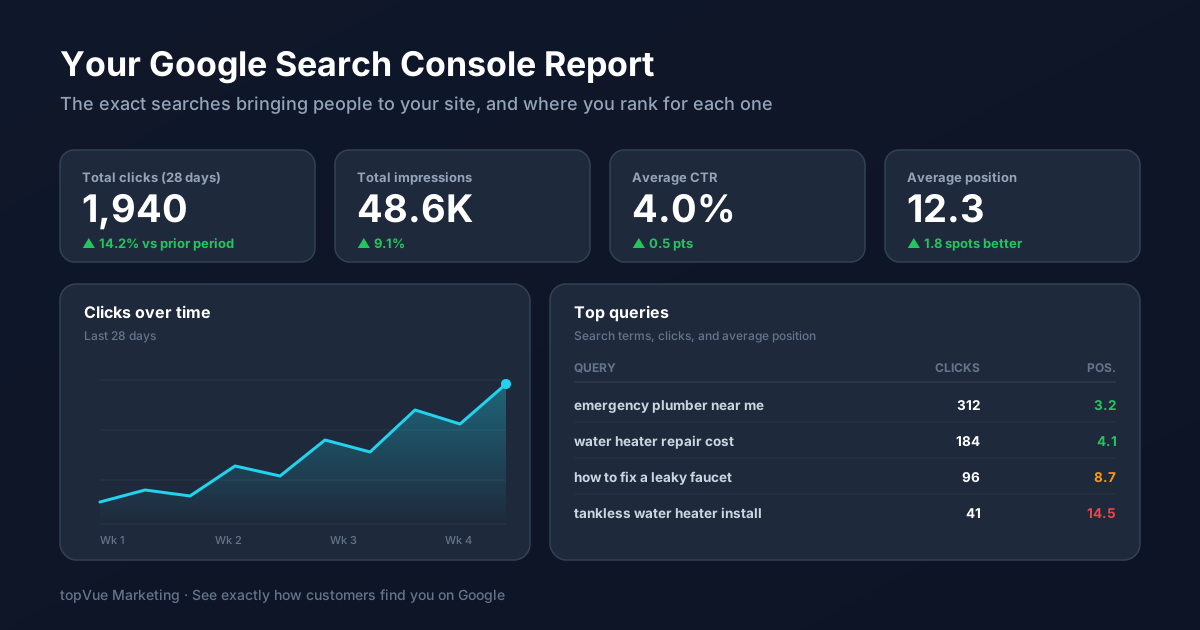
You know people find your business on Google, but do you know exactly what they typed to get there? Not your guesses, the real search terms. Most small business owners have no idea, and the free tool that would tell them is sitting unopened in the same Google account they already use for email.
That tool is Google Search Console, and it is the closest thing you have to reading your customers' minds. While Google Analytics tells you what people did once they landed on your site, Search Console tells you what happened before the click: the words they searched, how often you showed up, and where you ranked. Here is how to set it up and pull real SEO decisions out of it.
First, Get It Set Up and Verified
Go to search.google.com/search-console and sign in with the Google account tied to your business. You will be asked to add and verify your website so Google knows you own it. The easiest method for most owners is the "domain" option, which you confirm by adding a small text record at your domain registrar (the company where you bought your web address). If that sounds intimidating, the "URL prefix" method lets you verify through your website platform or through Google Analytics if you already have it running.
Once verified, do not expect instant data. Search Console starts collecting from the day you verify and fills in over the following days. Give it about a week before the reports are worth studying.
The Performance Report Is Where the Gold Is
Ignore most of the menu at first. The Performance report answers the questions that actually change what you do. It shows four numbers you can toggle on and off: total clicks (visits from search), total impressions (how many times you appeared in results), average click-through rate (the share of impressions that became clicks), and average position (your typical ranking).
The real value is in the Queries tab underneath. It lists the actual search terms bringing you impressions and clicks. This is unfiltered insight into how customers describe what you sell, often in words you would never have chosen yourself. Those phrases belong in your page titles, your headings, and your next few blog posts. If you have read our guide to keyword research, this is the same idea with one advantage: these are keywords you already rank for, straight from Google.
Hunt for "Striking Distance" Keywords
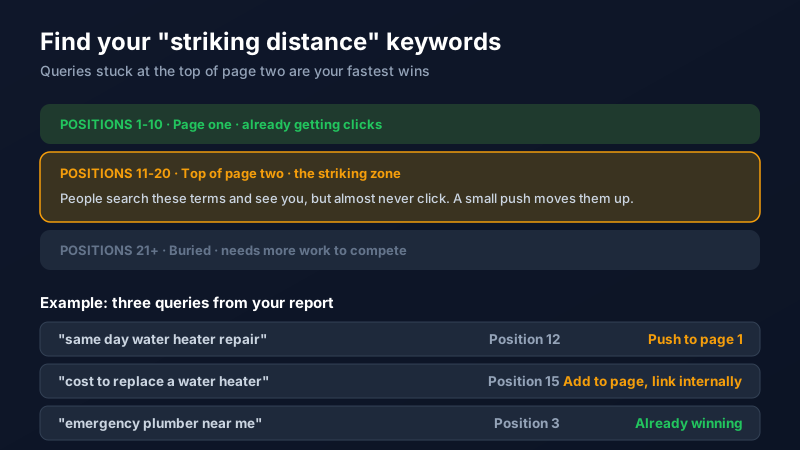
Here is the single most useful move in the whole tool. In the Queries tab, add the average position column and sort your queries so you can spot the ones ranking between 11 and 20. These sit at the top of page two, where searchers see your listing but almost never click through.
These terms are your quickest wins because Google already considers your page relevant. It just needs a nudge. Update the page that ranks for that term: work the exact phrase into the title and an early heading, add a paragraph that answers the question more directly, and link to the page from other relevant pages on your site. A term stuck at position 13 can often climb onto page one with an afternoon of work, and page one is where the clicks live.
Fix the Pages Google Cannot See
Rankings do not matter if Google cannot properly read your pages. The Pages report (under the Indexing section) shows which of your pages are indexed and which are excluded, along with the reason. If an important page shows up as "not indexed," that page is invisible in search no matter how good it is. Common causes are simple to fix once you can see them, and Search Console flags them for you instead of leaving you to guess.
This is also where you keep an eye out for the technical problems that quietly drag down rankings, the same kind we cover in our post on common SEO mistakes. Page speed issues show up here too, which pairs well with our guide to speeding up your website.
Use It Alongside Analytics, Not Instead
Search Console and Google Analytics are two halves of the same picture. One shows the search that led to the click; the other shows what the visitor did after. Neither answers the whole question on its own.
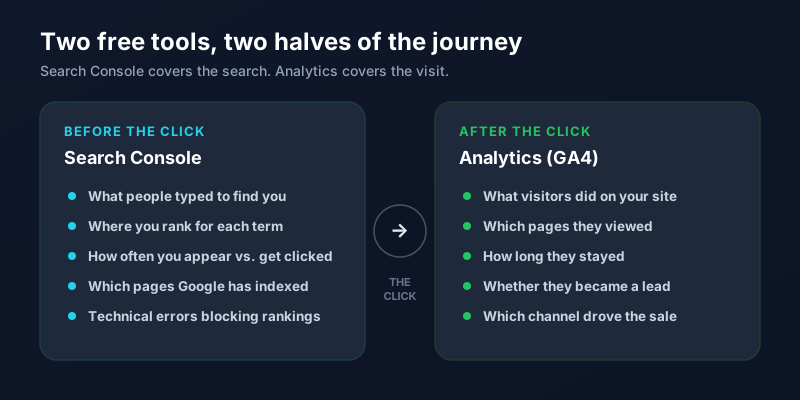
Read them together and the story gets clear. Search Console shows a query climbing in impressions; Analytics (see our GA4 guide) shows whether those visitors turned into leads. That combination tells you not just what ranks, but what ranks and pays. You do not need to log in daily. A focused look every couple of weeks is plenty to spot new opportunities and catch problems early. If setting up the tracking or turning the reports into an SEO plan feels like more than you want to take on, our SEO team does exactly this, or you can reach out and we will point you in the right direction.
Frequently Asked Questions
Is Google Search Console free?
Yes, Google Search Console is completely free with no paid tier. All you need is a Google account and the ability to verify that you own your website. It is one of the highest-value free tools available to a small business, giving you data about your search rankings that would otherwise cost money through third-party SEO software.
What is the difference between Google Search Console and Google Analytics?
Search Console covers what happens on Google before someone clicks: the search terms they used, how often you appeared, and where you ranked. Google Analytics covers what happens after the click: which pages visitors viewed, how long they stayed, and whether they became a lead or customer. They answer different questions, so most businesses use both together for the full picture.
How long does it take for Search Console to show data?
Search Console only begins collecting data from the day you verify your site, and it does not include history from before that. Expect the Performance report to start filling in within a day or two, but wait about a week before drawing conclusions, since you need enough data to see reliable patterns in your queries and rankings.
What are striking distance keywords?
Striking distance keywords are search terms where you rank roughly between positions 11 and 20, meaning the top of page two. They are valuable because Google already sees your page as relevant, so a small improvement, such as adding the phrase to your title and strengthening the page, can push you onto page one where the clicks are. Search Console makes these easy to find in the Queries report.
Why is my page showing as "not indexed" in Search Console?
A "not indexed" status means Google has not added the page to its search results, so it cannot rank at all. The Pages report lists the specific reason, which is often a simple fix such as a page being blocked, marked as a duplicate, or set to no-index by accident. Resolving these issues is one of the fastest ways to recover search visibility you did not know you were missing.