Your website can have perfect copy, a beautiful design, and a generous ad budget behind it, and still lose customers before a single word loads. Speed is the silent killer of small business websites. Visitors decide in a couple of seconds whether to stay or hit the back button, and Google watches that behavior closely when it decides where to rank you.
The good news is that website speed is one of the most fixable problems in digital marketing. You do not need to be a developer to find what is slowing your site down or to knock out the fixes that matter most. Here is how to measure your speed, understand what the numbers mean, and make the changes that win back both rankings and sales.
Step 1: Measure Where You Stand
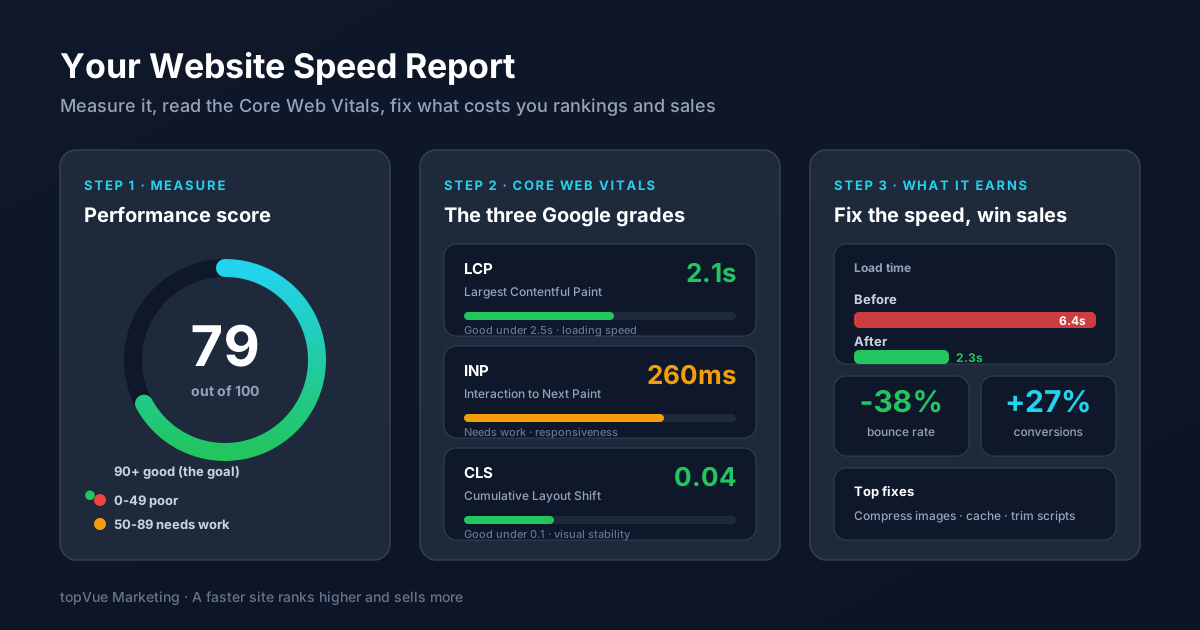
You cannot fix what you have not measured. Start with Google PageSpeed Insights, a free tool where you paste your URL and get a performance score from 0 to 100, along with a detailed breakdown. Anything below 50 is poor, 50 to 89 needs work, and 90 or above is the goal. Run the test on both your mobile and desktop views, because mobile is almost always slower and is what most of your visitors actually use.
Do not panic at a low score. Treat it as a to-do list. The same report tells you exactly which files and elements are dragging you down, ranked by how much time they cost.
Step 2: Understand the Core Web Vitals
Google grades your pages on three specific metrics called Core Web Vitals, and they feed directly into your search rankings. Knowing what each one means helps you read your report instead of staring at it.
LCP (Largest Contentful Paint) measures how long the biggest element on screen takes to load, usually your hero image or headline. Aim for under 2.5 seconds. INP (Interaction to Next Paint) measures how quickly your page responds when someone taps or clicks. Aim for under 200 milliseconds. CLS (Cumulative Layout Shift) measures how much your page jumps around as it loads, the annoying effect where you go to tap a button and an ad shoves it down. Aim for under 0.1.
Together these three numbers describe the experience of actually using your site: how fast it appears, how fast it reacts, and how stable it feels. Fix them and you are improving real customer experience, not just chasing a score.
Step 3: Knock Out the Biggest Speed Killers
Most slow small business sites are slow for the same handful of reasons. Tackle them roughly in order of impact and you will see your score climb fast.
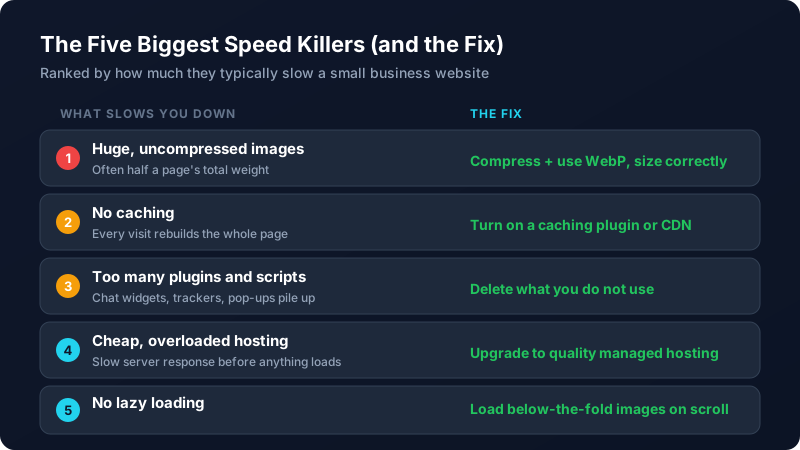
Images are almost always the number one culprit, often making up half of a page's total weight. Compress every image, save them in a modern format like WebP, and never upload a 4000-pixel photo to display in a 600-pixel box. Next, turn on caching so returning visitors are not forced to rebuild the entire page from scratch. Then audit your plugins and third-party scripts, because every chat widget, tracker, and pop-up adds load time. Delete anything you are not actively using. Finally, if your server response is sluggish even on a light page, the problem is your hosting, and an upgrade to quality managed hosting often pays for itself.
Speed is not a one-time project. A bloated image or a new plugin can undo your gains overnight, so it pays to recheck your scores every few months. It also works hand in hand with your other on-site work, so it belongs on the same list as fixing the common SEO mistakes that hold small sites back and tightening up your landing pages for conversions. If the technical side feels like more than you want to take on, our team can audit your site and handle the fixes for you.
Frequently Asked Questions
How fast should my website load?
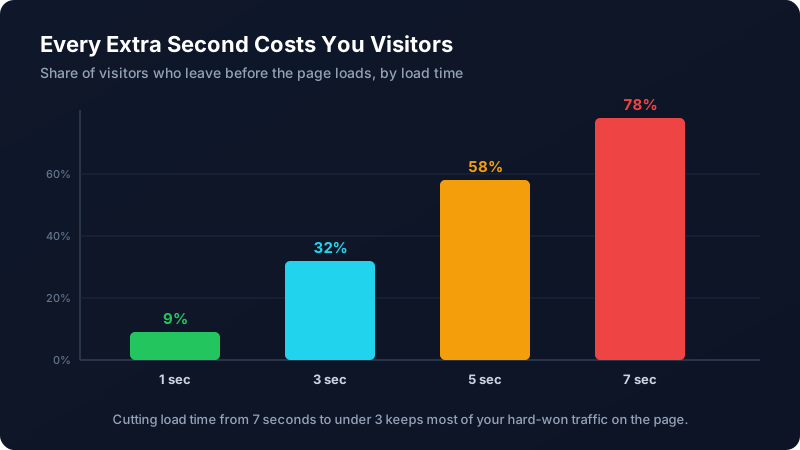
Aim for a fully loaded page in under 3 seconds, with the largest visible element (your LCP) appearing in under 2.5 seconds. Studies consistently show bounce rates climb sharply past the 3-second mark, so under 3 seconds is the practical target for keeping visitors on the page. Faster is always better, especially on mobile.
Does website speed actually affect my Google rankings?
Yes. Google uses Core Web Vitals (LCP, INP, and CLS) as ranking signals, so a faster, more stable page can rank higher than a slower competitor with similar content. Speed also affects rankings indirectly: a slow site sends visitors back to the search results quickly, and that behavior tells Google your page was not a good answer.
What is the most common reason a website is slow?
Large, uncompressed images are the most common culprit by far, often accounting for half of a page's total weight. Compressing your images, saving them in a modern format like WebP, and sizing them correctly for where they appear is usually the single highest-impact fix you can make.
How do I check my website speed for free?
Use Google PageSpeed Insights. Paste your URL and it returns a performance score out of 100, your Core Web Vitals, and a prioritized list of what is slowing you down. Test both the mobile and desktop versions, since mobile is typically slower and is what most visitors use.
Can a slow website hurt my ad campaigns too?
Absolutely. If you pay for clicks through Google Ads or social ads and your landing page is slow, many of those paid visitors leave before the page loads, so you pay for the click but get nothing. A slow page can also lower your ad quality scores, which raises your cost per click. Fast pages make every marketing dollar work harder.