You worked hard to rank on page one, and then the click goes to the business listed below you. Frustrating, but fixable. The reason is often not your ranking at all. It is the two lines of gray text under your title, the part most owners never bother to write. That text is your meta description, and it is the closest thing to a free ad Google will ever give you.
A meta description is the short summary that appears beneath your page title in search results. It is not a ranking factor, so writing a great one will not push you up the results. What it does is decide whether people click your listing or scroll past it. When two businesses rank next to each other, the one with the sharper description wins the visit, and the clicks add up fast.
Keep It Under 155 Characters
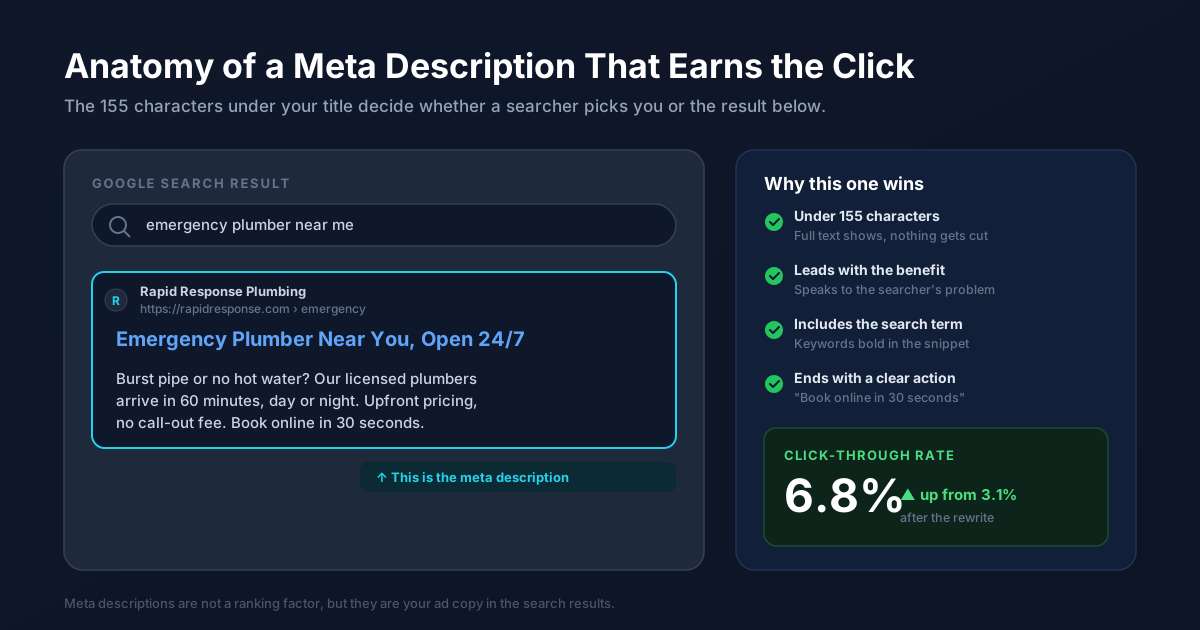
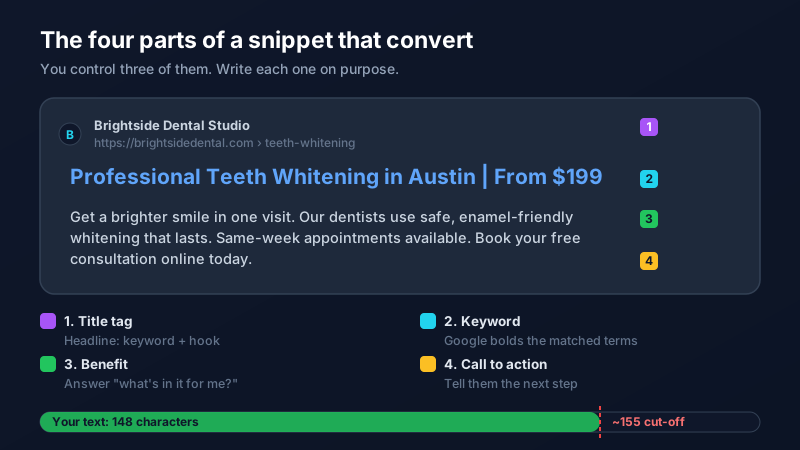
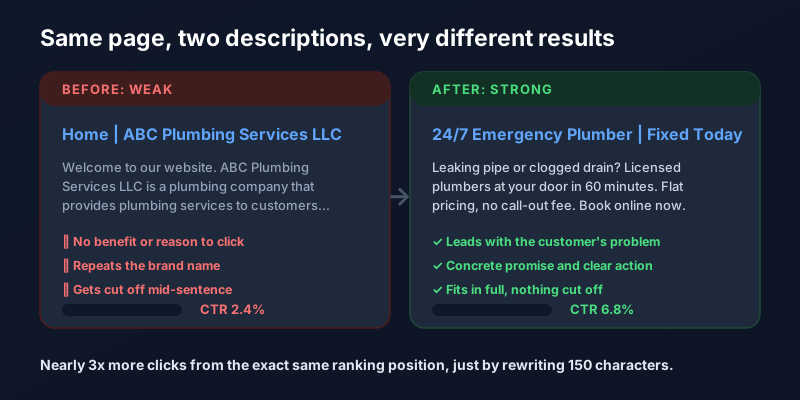
Google gives you roughly 155 characters before it cuts your description off with an ellipsis. On mobile the limit is even tighter. Aim for 150 to 155 characters so your full message shows and never trails off mid-sentence. Front-load the most important words, because if anything gets trimmed, it will be the end. A description that reads like a complete thought looks more trustworthy than one that stops in the middle.
Lead With the Benefit, Not Your Name
The most common mistake is opening with "Welcome to our website" or your company's full legal name. The searcher does not care yet. They have a problem, and they are scanning for the result that solves it fastest. Open with what they get: a brighter smile, a leak fixed today, a quote in two minutes. Speak to the outcome they typed the search to find. Your brand name belongs on the page, not at the front of a 155-character pitch.
Work In the Search Term
When your description contains the words someone searched for, Google bolds those words in the result, which makes your listing catch the eye. Include the main keyword for the page naturally, the same phrase a customer would actually type. If you are not sure what that phrase is, our guide to keyword research shows you how to find it, and Google Search Console tells you the exact queries already bringing you impressions. Match your description to those, not to how you describe yourself internally.
End With a Clear Next Step
Close with a small call to action that tells the reader what to do: "Book online in 30 seconds," "Get a free quote," "See same-day availability." It sets an expectation and gently nudges the click. You are not writing a hard sell, just pointing to the door. A description that ends with a concrete action consistently outperforms one that simply trails off.
Write a Unique One for Every Important Page
Do not reuse the same description across your site, and do not leave it blank. When you leave it blank, Google pulls a random sentence from the page, which is often the wrong one. Duplicate descriptions across pages are one of the quiet SEO mistakes that make a site look neglected. Give your homepage, your top service pages, and your best blog posts each a description written for that page and the searcher it serves.
Remember Google Sometimes Rewrites It
Here is the honest caveat: Google does not always use the description you write. It may swap in a snippet from your page that better matches the specific search. That is fine. A well-written description is still the version shown most often, and it is the one you control. Think of it as strong ad copy that also gives Google a great default to fall back on. The click you win here still has to land on a page that delivers, so pair a strong description with a focused landing page that keeps the promise.
The Bottom Line
Meta descriptions are the highest-leverage 155 characters on your website. They will not move your ranking, but they decide how much traffic that ranking actually earns you. Keep them short, lead with the benefit, include the search term, and end with an action. Spend an afternoon rewriting the descriptions on your most important pages and you can grow your traffic without earning a single new ranking. If auditing and rewriting them across your whole site sounds like more than you want to take on, our SEO team handles exactly this, or you can reach out and we will take a look.
Frequently Asked Questions
Do meta descriptions affect Google rankings?
No, meta descriptions are not a direct ranking factor, so writing a better one will not push your page higher in search results. What they affect is your click-through rate, meaning how many people who see your listing actually click it. Since more clicks from the same ranking means more traffic, a strong description is still one of the most valuable SEO improvements you can make.
How long should a meta description be?
Aim for 150 to 155 characters. Google typically cuts descriptions off around 155 characters on desktop and even shorter on mobile, replacing the rest with an ellipsis. Keeping yours within that limit ensures your full message displays and does not trail off mid-sentence, and front-loading the most important words protects you if any part gets trimmed.
What happens if I do not write a meta description?
If you leave the meta description blank, Google automatically pulls a snippet of text from somewhere on the page, which is often a random or poorly chosen sentence that does nothing to sell the click. Writing your own gives you control over the first impression a searcher gets. It is one of the simplest wins in SEO, so it is worth doing for every important page.
Why does Google sometimes show a different description than the one I wrote?
Google may replace your meta description with a snippet from your page when it thinks that text better matches a specific search query. This is normal and not a penalty. Your written description is still displayed the majority of the time and remains the version you control, so it is always worth writing a strong one rather than leaving it to chance.
Should every page have a different meta description?
Yes. Each important page should have its own unique meta description that reflects what that specific page offers and the searcher it serves. Duplicate descriptions across multiple pages look neglected to both users and search engines. Prioritize your homepage, your main service pages, and your best-performing blog posts first, then work through the rest over time.