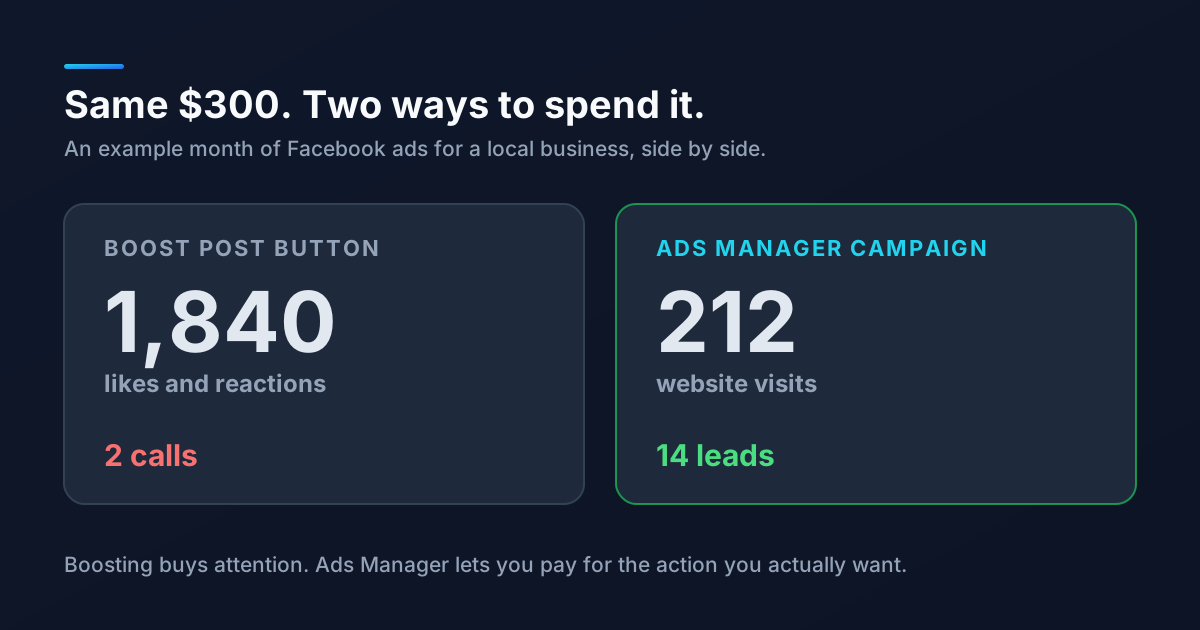
You post a great photo of a finished project. It gets a few likes. Facebook shows a bright blue button underneath it: Boost post. Two minutes and $50 later, the likes roll in. The phone does not ring.
That pattern is the single most common thing we hear from small business owners who say Facebook ads "don't work." Usually, Facebook ads were never really tried. A boosted post was.
What Boosting a Post Actually Does
Boosting is a shortcut version of a Meta ad. You pick a post that already exists, choose a rough audience, set a budget and a duration, and Meta handles the rest. It is fast and genuinely useful in a few situations.
The catch is what Meta optimizes for. Unless you change it, a boost is usually tuned to get reactions, comments, and shares from the people most likely to give them. Those people are often not the ones most likely to buy. Meta is very good at delivering exactly what you ask for, so if you ask for engagement, you get engagement.
What Ads Manager Gives You Instead
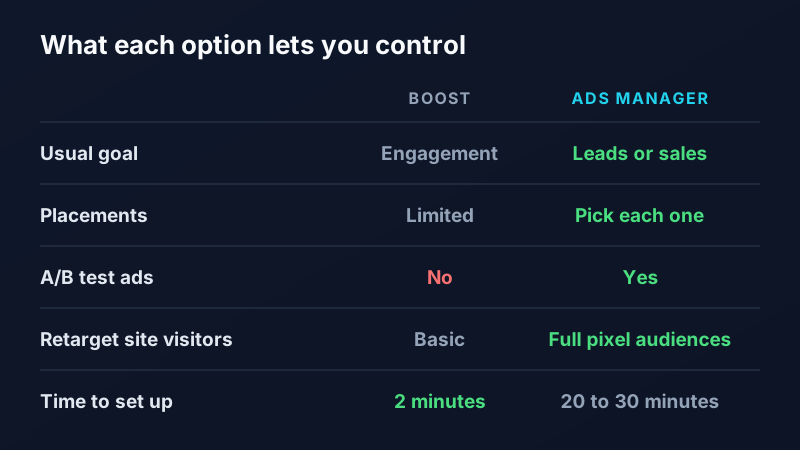
Ads Manager is the full tool behind every Facebook and Instagram ad. It takes longer to set up (plan on 20 to 30 minutes for a first campaign), but you get control over the things that decide whether an ad makes money.
1. You pay for the result you want
Choose a Leads or Sales objective and Meta looks for people likely to fill out a form, call, or buy, rather than people likely to tap a heart. This one change usually matters more than any targeting tweak.
2. You can test before you scale
Ads Manager lets you run two or three versions of an ad at once (different photos, headlines, or offers) and see which one produces leads. With a boost, you are betting the whole budget on one post.
3. You can reach people who already know you
With the Meta Pixel installed on your website, you can show ads to people who visited your pricing page but did not reach out. Those audiences are small and cheap, and they convert far better than strangers. We cover the setup in our guide to retargeting ads.
4. You can see what you got for the money
Ads Manager reports cost per lead, not just reach and likes. If you also track calls and form fills on your site, you can connect ad spend to real customers instead of guessing. Our post on telling which marketing brings in customers walks through the basics.
When Boosting Is Perfectly Fine
Boosting is not a scam. It is just a tool for a narrower job.
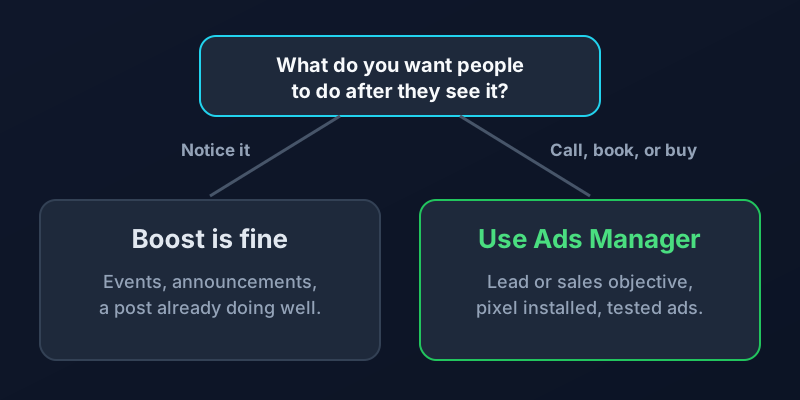
Boost when you want more local people to see an event, a holiday hours update, a new location announcement, or a post that is already getting strong organic engagement. If the goal is awareness and the post is good, a small boost is a reasonable spend.
Use Ads Manager any time the goal is a phone call, a booked appointment, a quote request, or a sale. That covers most of what a small business needs from paid social.
A Simple Starting Setup in Ads Manager
- Install the Meta Pixel on your site first, so Meta can learn who converts.
- Pick a Leads objective and send people to a focused page, not your homepage. Our landing page guide covers what that page needs.
- Target your real service area by city or radius, and leave interests broad at first.
- Run two or three ad versions for two weeks, then turn off the weakest.
- Judge it on cost per lead, never on likes.
Paid social works best on top of a steady organic presence, so it is worth having a social media strategy in place before you spend. If you would rather have someone build and manage the campaigns for you, our social media management team does exactly that. Get in touch and we will look at what your last boost actually bought.
Frequently Asked Questions
Is it better to boost a post or create an ad on Facebook?
For leads, calls, and sales, creating an ad in Ads Manager is almost always better, because you can choose a conversion objective, test multiple versions, and retarget website visitors. Boosting is fine for awareness goals like promoting an event or an announcement to local followers.
Why do boosted posts get likes but no customers?
Boosted posts are usually optimized for engagement, so Meta shows them to people most likely to react or comment. Those people are often not ready to buy. When you choose a Leads or Sales objective in Ads Manager, Meta looks for people likely to take that action instead.
How much should a small business spend on Facebook ads?
Many local businesses start with $10 to $30 per day per campaign, which is enough for Meta to learn who converts within a couple of weeks. Set your budget based on what a new customer is worth to you, and judge results by cost per lead rather than reach.
Do I need the Meta Pixel to run Facebook ads?
You can run ads without it, but the Pixel is what lets Meta optimize for website conversions, measure leads, and build retargeting audiences. For any campaign aimed at leads or sales, install it before you launch.