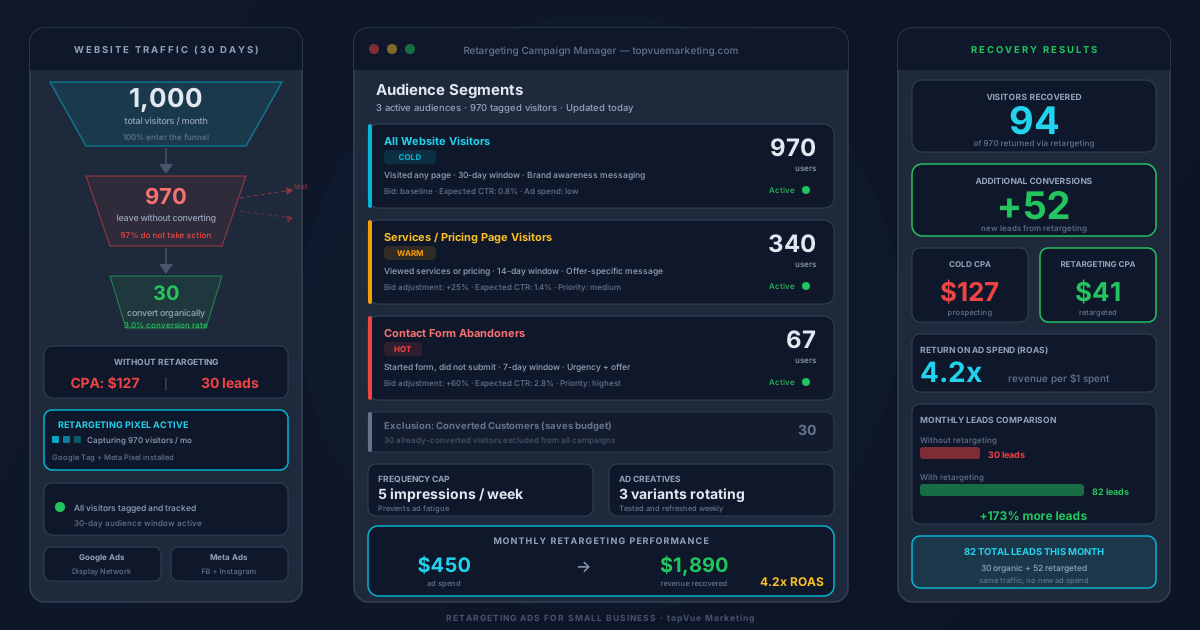
Most people who visit your website leave without taking action. That's not unusual. Studies consistently show that 97% of first-time visitors leave without converting. They got distracted, compared options, or simply weren't ready yet. Without a follow-up strategy, those visitors are gone and you never reach them again.
Retargeting changes that. By placing a small tracking pixel on your website, you can follow those visitors with targeted ads as they browse other sites, scroll through social media, or search on Google. When they see your ad again at the right moment, they're far more likely to return and convert. For businesses already running paid advertising, retargeting is often the highest-ROI campaign in the account.
How Retargeting Works
When someone visits your website, a snippet of code called a pixel fires in their browser and stores a small cookie. That cookie is what allows ad platforms like Google, Meta (Facebook and Instagram), and LinkedIn to identify that person and serve your ads to them later across their networks.
Retargeting campaigns typically run on two platforms: Google Ads (which covers YouTube, Gmail, and millions of partner sites through the Display Network) and Meta Ads (which covers Facebook and Instagram). Both require you to install a platform-specific pixel on your website before you can build audiences.
Install Your Pixel Before You Spend a Dollar
The pixel needs to be on your site before you start collecting audiences, because it can only track visitors from the moment it's installed forward. If you start a retargeting campaign without first installing the pixel and building an audience, you'll have nothing to target.
Google Ads uses the Google tag. Meta uses the Meta Pixel. Both are straightforward to install through Google Tag Manager, which lets you manage all your tracking snippets from one place without touching your site code every time you make a change.
Build Segmented Audiences, Not One Giant List
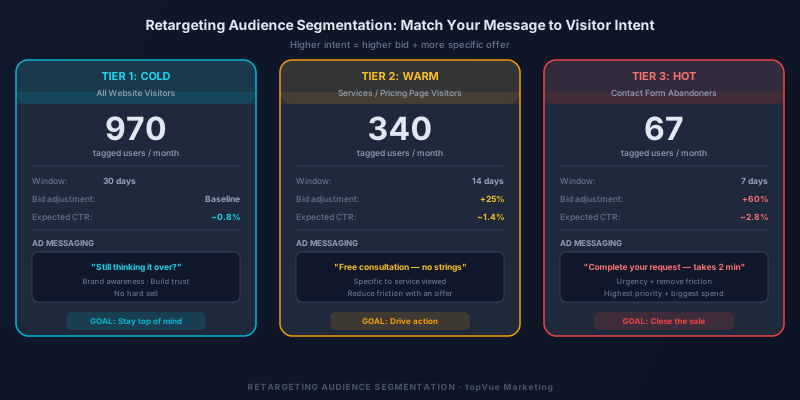
The biggest mistake businesses make with retargeting is treating all visitors the same. Someone who spent eight minutes on your pricing page is a very different prospect than someone who bounced from your homepage after ten seconds. Audience segmentation lets you match your message to where each visitor is in the buying journey.
Three tiers work well for most businesses:
All website visitors (large audience, lower intent): Broad brand awareness messaging and lower bids. These people visited but showed minimal engagement.
Service or product page visitors (medium audience, higher intent): Specific messaging that references what they viewed. If they spent time on your services page, your ad should speak directly to that service.
Contact form or quote request abandoners (small audience, highest intent): Urgency-driven messages with your strongest offer and highest bids. These visitors were one step away from converting.
Write Ads That Speak to the Next Step
Your retargeting ad should not look like a generic brand ad. It should give the visitor a specific reason to come back. For someone who viewed your pricing page, an ad offering a free consultation creates urgency. For someone who started filling out a contact form, a reminder that they can complete their request in two minutes reduces friction.
The more specific the ad is to where the visitor dropped off, the higher your click-through rate will be. Pair strong retargeting ads with a well-optimized landing page (see our guide on landing page optimization) to get the most out of recovered traffic.
Set Frequency Caps to Avoid Ad Fatigue
One common retargeting mistake is showing the same ad too many times. When someone sees your ad 20 times in a week, they stop noticing it and start resenting your brand. Set a frequency cap of 5 to 7 impressions per week for most campaigns. Rotate 2 to 3 different ad creatives so the message stays fresh. Also set an exclusion list for people who have already converted, so you're not wasting budget on existing customers.
Measure Your Retargeting Performance
Track retargeting campaigns separately from prospecting campaigns so you can compare performance clearly. The key metrics to watch:
Cost per acquisition (CPA): Retargeting CPAs are typically 50 to 70% lower than prospecting campaigns because the audience already knows your business. If your retargeting CPA is comparable to your prospecting CPA, your audience segmentation needs work.
Return on ad spend (ROAS): Total revenue generated relative to ad spend. Retargeting should consistently be one of your highest-ROAS campaigns. Combining strong retargeting with solid Google Ads Quality Scores compounds your results across the full paid channel.
Start Small, Then Scale
You don't need thousands of monthly visitors to start retargeting. Even 200 to 300 monthly website visitors is enough for a meaningful campaign. Start with a 30-day audience window, keep your creative simple, and measure results before scaling your budget. As your traffic grows, expand audience windows, add more segmentation layers, and test different offers. Retargeting compounds in value as your audience pools grow larger and your ad creative becomes more refined.
Frequently Asked Questions
How much does retargeting advertising cost?
Retargeting campaigns can start for as little as $5 to $10 per day. Because you're targeting warm traffic that already knows your business, cost per click and cost per acquisition tend to be significantly lower than cold prospecting campaigns, making retargeting one of the most budget-friendly options for small businesses.
Is retargeting the same as remarketing?
The terms are often used interchangeably. Retargeting typically refers to serving display or social ads to people who visited your website using pixel tracking. Remarketing, in Google's original terminology, referred to email campaigns targeting past customers or leads. Today both terms are commonly used to describe any follow-up advertising to people who have already interacted with your business.
How long should I retarget website visitors?
Most businesses see the best results with audience windows of 30 to 90 days. After 90 days, visitor intent has typically faded enough that retargeting costs outweigh returns. For high-ticket services with longer decision cycles, a 90-day or 180-day window can work well. For lower-cost offers, a 14 to 30-day window keeps your audience fresh and engaged.
What is a good click-through rate for retargeting ads?
Retargeting display ads average a click-through rate of 0.7% to 1.0%, which is roughly 10 times the average CTR of standard display ads. For retargeting on social platforms like Facebook and Instagram, CTRs of 1% to 3% are typical for well-segmented audiences. If your retargeting CTR falls below these benchmarks, test new creative and tighten your audience segmentation.
Can retargeting work for service businesses?
Yes, retargeting is highly effective for service businesses. Many service purchases involve a longer consideration period than product purchases, making retargeting especially valuable for staying visible while prospects research their options. A local contractor, marketing agency, law firm, or healthcare provider can all benefit from retargeting campaigns that keep their brand in front of potential clients during the decision-making process.